
The most effective digital product bundles pick one buyer, one outcome, and one core asset, then build supporting files around getting that buyer to the result faster. Add tiered pricing on top and you've got a structure that outperforms selling files individually. Start small: one buyer, one job, one anchor bundle, then run it as a pilot before you scale. Platforms exist to publish and deliver exactly this kind of offer.
TL;DR:
- Most successful bundle pricing relies on three tiers: a low-priced starter, a higher-margin mastery, and a premium VIP option, with discounts between 40 and 60 percent for the middle tier.
- Bundles should focus on one core asset and two to three supporting items that directly shorten the buyer's path, eliminating unnecessary files that do not serve the intended outcome.
- Clear and concise delivery instructions, including a single welcome page, consistent file naming, and explicit support and licensing terms, drastically reduce support requests and buyer confusion.
- Pricing must be established privately based on production, support, and platform fees, with the public discount and tier structure tested via small pilots before scaling.
- Platforms like BibliOWLteca simplify global sales with instant delivery, multi-currency support, and built-in tax management, making it easier to focus on content rather than logistical issues.
Table of Contents
- What roles can a digital product bundle play?
- How do you design a bundle that actually delivers a result?
- What should you charge, and how many tiers do you need?
- How do you deliver a bundle without drowning in support requests?
- What belongs on the bundle's product page?
- How do you test a bundle before committing to it fully?
- Why bundles work better on the right infrastructure
- Ready to publish your first bundle on BibliOWLteca?
- Selected resources to read next
- Sources
- FAQ
What roles can a digital product bundle play?
Not every bundle is doing the same job, and treating them as interchangeable is where most creators lose margin. A starter bundle hooks a new buyer with a low-friction win, usually priced to convert rather than to profit heavily. A mastery bundle (your core, anchor offer) delivers the full result and carries your best margin. A VIP bundle adds direct access, coaching, or review time on top of the mastery bundle for buyers who want speed over self-service. A promotional bundle is time-limited, built to clear stock or mark a launch.
Typical component mixes look like this:
- Starter: short ebook + one editable checklist template
- Mastery: full course + workbook + template pack
- VIP: mastery bundle + a live coaching call or written feedback session
The role you pick decides how far you can discount and how much support you'll absorb. VIP bundles should almost never carry the same 40 to 60 percent-off treatment as a starter kit, because coaching time has a real cost that a discount erodes fast.
How do you design a bundle that actually delivers a result?
Start with the core asset, the single item that does most of the work (the course, the flagship ebook, the template system), then ask which supporting assets genuinely shorten the path to the outcome. Bundling works because it turns scattered offers into a clearer buying path built around one destination, not because it adds more files.
- Name the outcome in one sentence before you choose a single asset.
- Pick the core asset that delivers most of that outcome alone.
- Add two or three supporting assets that remove a specific obstacle (a template that saves setup time, a checklist that prevents a common mistake).
- Package with a quick-start guide, editable file formats, and a note on software compatibility.
- Cut anything that doesn't serve that one outcome, even if it feels like "extra value".
A tightly curated bundle that completes one workflow tends to outperform a sprawling archive of loosely related files, because buyers are paying for a result, not a folder size.
Pro Tip: If you can't explain what a supporting asset does for the buyer in one sentence, it doesn't belong in the bundle. Cut it and keep the file for a future upsell.
What should you charge, and how many tiers do you need?
Work out your private price floor before you set a single public price. Add up production time, hosting and platform fees, ongoing support hours, and your minimum margin. That number stays private. It's the line you never discount below, no matter how tempting a flash sale looks.
- Production and update time (amortised across expected sales)
- Hosting, delivery, and payment processing fees
- Support hours, especially for anything time-based like coaching or reviews
- Your minimum acceptable margin
From there, test a three-tier structure: starter, mastery (your anchor), and VIP. Most buyers land on the middle tier when the anchor discount sits in a sensible range, and a discount around 40 to 60% off the combined standalone value is a commonly cited sweet spot for improving both conversion and average order value.
Treat that 40 to 60 percent figure as a starting range to test against your own floor, not a rule to apply blindly, especially where support time is involved.
How do you deliver a bundle without drowning in support requests?
Buyers judge a bundle within minutes of paying, so friction at delivery kills the good first impression you just paid to earn. A single welcome page with a quick-start guide and a file index cuts confusion and reduces the "where do I start" messages that eat your week.
- One welcome page linking every file, in the order the buyer should use them
- Consistent naming (module numbers, version dates) so nothing looks orphaned
- Clear labelling of which files are editable and which are locked templates
- A short compatibility note (software, file formats, required apps)
- A plain licence statement: personal use, client use, or resale rights
- A stated support boundary, such as email support for setup questions only, not open-ended coaching
Set the licence and support terms once, on the page itself, so you're not negotiating them individually with every buyer.
What belongs on the bundle's product page?
The product page has to do the selling your bundle can't do on its own, so lead with a one-line promise stating exactly who this is for and what changes for them. Follow it with a visual stack showing every component, because detailed, itemised descriptions paired with stacked cover images measurably affect revenue.
- Open with the outcome and the best-fit buyer, in one sentence each.
- Show a stacked image of every asset included, not just the cover.
- Itemise each component with its standalone value, then show the bundle total beneath it.
- Add a short demo (screen recording, sample page) if the format allows it.
- Include proof tied to the specific outcome, not generic praise.
- State your refund or guarantee policy plainly, near the buy button.
Declaring the itemised standalone total does more selling than any adjective you could add to the headline. A sales page built for creators is worth studying if you're writing this copy for the first time.
How do you test a bundle before committing to it fully?
Run the bundle as a pilot before treating it as a permanent product. A waitlist, a limited-run promotional bundle, or a small paid test group all work, and each tells you something different about demand.
- Conversion rate from page visit to purchase
- Activation: whether buyers actually open and use the core asset
- Refund rate, which often signals a mismatch between promise and delivery
- Support load per sale, especially for anything with a live component
- Repeat purchase rate from the same buyers on your next offer
Pro Tip: Change one variable per test, price, the cover stack, or the anchor claim, never all three at once. Otherwise you won't know what actually moved the number.
Guides on selling online courses for global success cover this kind of iterative launch testing in more depth if you're validating a course-based bundle specifically.
Why bundles work better on the right infrastructure
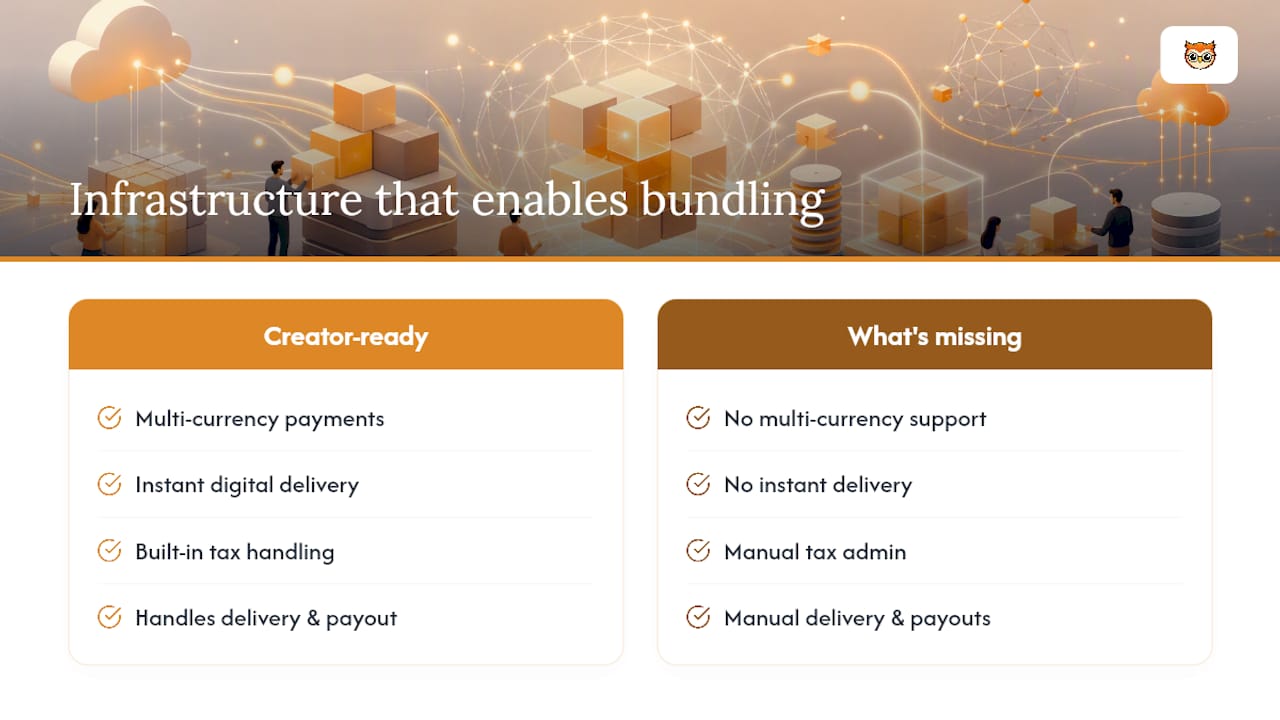
Bundling is fundamentally a product design and customer service problem, not a marketing trick, and the platform underneath it either supports that or gets in the way. Certain platforms are built for creators publishing this kind of offer, featuring multi-currency payments, instant digital delivery on purchase, and built-in tax handling that removes a layer of admin most creators underestimate until they've made their first international sale.
In practice, that means a creator can set up a storefront, list a starter, mastery, and VIP tier of the same core course, and let the platform handle delivery and payout while they focus on the content itself. What's missing from this picture is the specific proof: real bundle case studies, seller testimonials, and named creator examples that show the tiering model working at scale. That's the evidence worth adding once you have it.
— BibliOWLteca
Ready to publish your first bundle on BibliOWLteca?
Some platforms charge no monthly fee to get started; you only pay when a sale actually completes, which matters if you're testing a pilot bundle before committing budget to it. That's a meaningfully different starting point than an agency retainer or a platform that bills you whether or not the bundle sells.

Getting a bundle live follows a short sequence: sign up for the Creator Plan, build your product page with your tiers and inclusions, upload your files, and publish. The plan supports global payment methods, instant delivery on purchase, and tax handling built for cross-border sales, so you're not stitching together separate tools for each piece. Browse the ebook, course, and template categories to see how existing listings structure their tiers and file stacks before you build your own. If you're ready, start with the pricing page and have your first bundle live within a day.
Selected resources to read next
- Bundle Pricing Strategy: A Creator's Guide to More Sales
- Price Digital Product Bundles 2026: 40-60% Discount Sweet Spot
- Digital products: publish, sell, and thrive worldwide
Sources
- Bundle Pricing Strategy: A Creator's Guide to More Sales
- Price Digital Product Bundles 2026: 40-60% Discount Sweet Spot
FAQ
What is a digital product bundle exactly?
A digital product bundle is a set of digital goods, such as an ebook, a course, and templates, packaged and sold together around one clear outcome rather than sold as separate files. The strongest versions use one core asset with supporting materials that remove specific obstacles to that outcome.
How many tiers should a bundle have?
Three tiers, a starter, a mastery (anchor) bundle, and a VIP option, tends to work well because most buyers gravitate toward the middle option when it's priced against a clear anchor. That structure, paired with a discount in the 40 to 60% range off the standalone total, is a reasonable starting point to test.
How much discount should I offer on a bundle?
Bundles with time-based components like coaching calls need smaller discounts, since support cost does not reduce proportionally with the price.
What does it cost to sell bundles on BibliOWLteca?
BibliOWLteca's Creator Plan has no published monthly fee; instead, a transaction fee starting from €0.99 per sale applies when a purchase completes. That keeps costs tied to actual sales rather than a fixed monthly bill regardless of performance.
How do I stop bundle support requests taking over my time?
State your licence terms and support boundaries clearly on the delivery page itself, before anyone has a reason to email you. Pair that with a single welcome page and file index, since delivery friction is a major driver of support requests and refund requests alike.