
TL;DR:
- The creator economy is valued at 234 billion dollars by 2026, encompassing educators and experts.
- Creator platforms streamline content hosting, selling, and marketing without technical skills.
- Choosing the right platform involves considering fees, ownership of data, and community-building tools.
The creator economy is bigger than most people realise. Valued at $234 billion in 2026, it is no longer the exclusive territory of YouTube celebrities or Silicon Valley insiders. Educators, coaches, and subject-matter experts are quietly building serious income by packaging what they already know into e-books, courses, and digital downloads. The barrier is not talent or fame. It is knowing which tools to use. Creator platforms have made it genuinely straightforward for anyone to upload content, set a price, and sell to a global audience. This guide walks you through exactly how these platforms work, what they cost, and how to choose the right one so you can stop overthinking and start earning.
Table of Contents
- What is a creator platform?
- How creator platforms work: Features, mechanics and process
- Choosing the right platform: Price, fees, and ownership
- Expert strategies for scaling and retention
- Why common advice about creator platforms misses the mark
- Take the next step with BibliOWLteca
- Frequently asked questions
Key Takeaways
| Point | Details |
|---|---|
| Platform choice impacts profit | Selecting a creator platform with low or zero transaction fees increases your earnings as you scale. |
| Engagement tools drive retention | Features like drip content, community forums, and integrated analytics help keep your audience active and loyal. |
| Global selling is accessible | Creator platforms offer international sales and payment processing, allowing you to reach worldwide audiences effortlessly. |
| Self-hosting maximises control | Owning your platform enables you to manage your content, data, and audience without marketplace restrictions. |
What is a creator platform?
A creator platform is a digital tool that lets you build, host, and sell educational content without needing a developer or a technical background. Think of it as your all-in-one digital shop: you bring the knowledge, and the platform handles the infrastructure. Whether you want to sell e-books and courses worldwide or run a subscription-based membership, these tools are built to make that possible from day one.
At their core, creator platforms serve three functions. First, they give you a place to organise and present your content in a structured, professional format. Second, they connect you to payment processors so customers can buy your products securely. Third, they provide the marketing and analytics tools you need to grow your audience over time.
Leading platforms for content creators, educators, and experts include Thinkific, Teachable, Kajabi, and Podia. Each has its own strengths, but all of them share a common goal: removing the technical friction between your knowledge and your customer's screen.
Here is what you can typically expect from a well-built creator platform:
- Course builder: Drag-and-drop editors to structure video lessons, text modules, and quizzes
- E-commerce tools: Product pages, checkout flows, and upsell options
- Community features: Discussion forums, cohort spaces, and direct messaging
- Email marketing: Automated sequences, broadcast emails, and subscriber segmentation
- Analytics dashboard: Revenue tracking, student progress, and engagement metrics
- Integrations: Connections to tools like Zapier, ConvertKit, and Google Analytics
These features matter because they determine how much of your time goes into running the business versus creating content. A platform with weak analytics, for instance, leaves you guessing about what your audience actually wants.
"The best creator platforms do not just host your content. They become the operational backbone of your entire digital business."
For educators exploring digital distribution platforms, the distinction between a basic file-sharing tool and a proper creator platform is enormous. One gives you a download link. The other gives you a business.
It is also worth noting that creator platforms vary significantly in how they handle global transactions. Some are built primarily for North American markets, while others support dozens of currencies and international tax compliance out of the box. If reaching a global audience is your goal, that distinction is not a minor detail. It is a strategic priority.
How creator platforms work: Features, mechanics and process
Knowing what a creator platform is only gets you so far. Understanding how it actually works is what turns that knowledge into action.
The typical workflow follows a clear sequence. You start by building your product, whether that is a structured video course, a downloadable e-book, or a bundle of templates. Most platforms offer drag-and-drop editors that require no coding. You arrange your modules, upload your files, and add any interactive elements like quizzes or assignments.
Next, you set your pricing model. Options usually include one-time payments, subscription plans, payment instalments, or free access with a paid upgrade. Once pricing is configured, you connect a payment processor, typically Stripe or PayPal, and your checkout page is live.
The core mechanics of leading platforms include drag-and-drop course builders for video lessons, quizzes, and drip content, alongside integrated checkouts for one-time sales and subscriptions, community forums, email marketing, and analytics for engagement and revenue tracking. That is a substantial toolkit, and knowing how each piece fits together helps you use it more effectively.

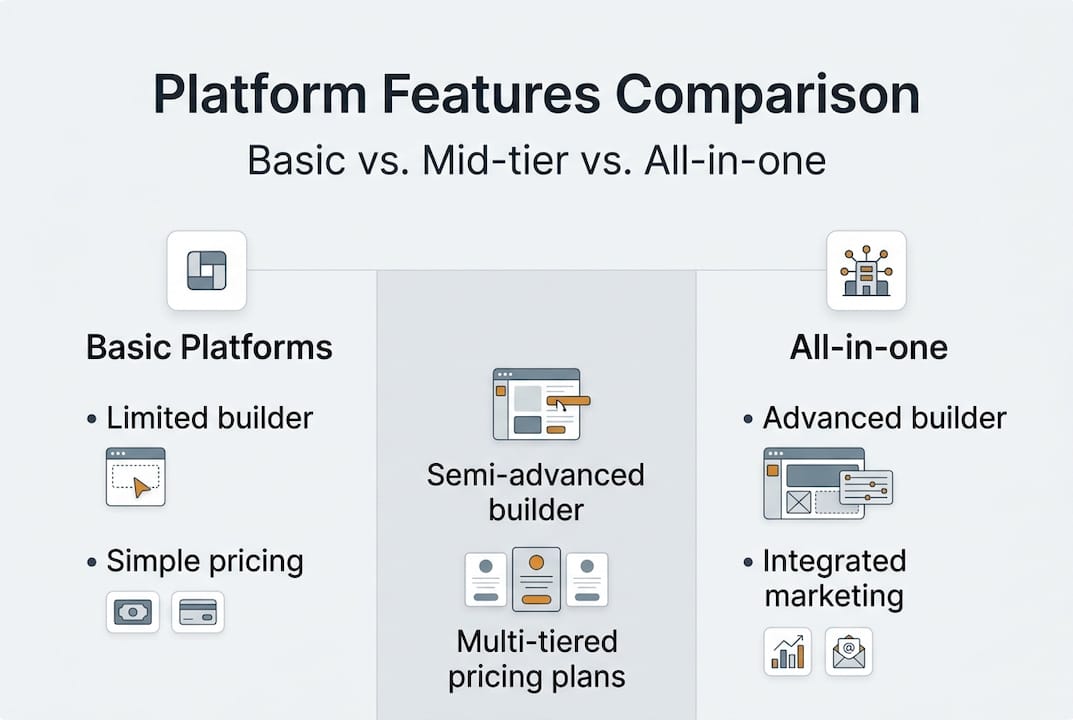
Here is a quick overview of how key features compare across platform types:
| Feature | Basic platforms | Mid-tier platforms | All-in-one platforms |
|---|---|---|---|
| Course builder | Limited | Full | Advanced |
| E-book/download sales | Yes | Yes | Yes |
| Email marketing | Third-party only | Basic built-in | Full suite |
| Community tools | None | Limited | Integrated |
| Analytics | Basic | Intermediate | Advanced |
| Mobile experience | Variable | Good | Optimised |
For a more detailed platform feature comparison, it is worth reviewing how specific tools stack up before committing.
One area that catches many creators off guard is mobile engagement. A significant portion of learners access content on smartphones. If your platform delivers a clunky mobile experience, you will see higher drop-off rates and lower completion scores, both of which damage your reputation and your revenue.
Pro Tip: When evaluating platforms, complete the entire student experience on your own mobile device before launching. If anything feels awkward or slow, your students will feel it too.
Our digital publishing guide covers the full process of getting your content structured and distributed effectively. And if you are thinking bigger picture, understanding how platforms grow your online business through integrated marketing tools is essential reading before you choose.
The platforms that consistently perform best are the ones that treat marketing as a first-class feature, not an afterthought. Built-in email sequences, affiliate programme support, and coupon tools are not luxuries. They are the engine that keeps your revenue growing after the initial launch excitement fades.
Choosing the right platform: Price, fees, and ownership
This is where many creators make costly mistakes. They choose a platform based on its interface or a free trial, then discover months later that the fee structure is quietly eating into their earnings.
Here is a comparison of the most widely used platforms and their pricing structures:
| Platform | Monthly price | Transaction fee | Revenue retention |
|---|---|---|---|
| Thinkific Basic | $36 | 0% | 100% (minus Stripe) |
| Teachable Starter | $29 | 7.5% | ~92.5% |
| Kajabi | $89 | 0% | 100% (minus Stripe) |
| Podia | $39 | 0% | 100% (minus Stripe) |
Pricing structures across platforms range from monthly subscriptions of $29 to $199, with transaction fees between 0% and 7.5% on entry-level plans, plus standard Stripe processing of 2.9% plus $0.30 per transaction. Those numbers matter enormously at scale.
The trade-off is real. Entry-level plans with transaction fees are convenient when you are testing and earning very little. But once revenue grows, those percentage cuts compound quickly. At $5,000 per month, a 7.5% fee costs $375 every single month, far more than the price difference between plan tiers.
There is also the marketplace versus self-hosted question. Platforms like Udemy offer built-in audiences, which sounds appealing. But Udemy's revenue share means they take between 50% and 75% of each sale, depending on how the student found your course. Self-hosted platforms let you retain 100% of revenue, but you are responsible for driving your own traffic.
Pro Tip: Calculate your break-even point before upgrading. If your transaction fees on a lower plan exceed the cost of upgrading to a 0% fee tier, the upgrade pays for itself. Most creators hit this point earlier than they expect.
Ownership is the other critical factor. Some platforms restrict your ability to export your student list or contact your audience directly. That is a significant risk. If the platform changes its terms, raises prices, or shuts down, you could lose access to the audience you spent years building. Always check the data export and email access policies before committing.
For a broader online product marketplace comparison, and to understand how different models affect your long-term global sales strategies, it is worth doing your research before you sign up for anything.
Expert strategies for scaling and retention
Choosing the right platform is only the beginning. What you do after launch determines whether you build a sustainable business or a one-time spike in sales.
The most effective approach follows a clear progression:
- Start small and validate: Launch your first product on a low-cost or free plan. Prove that people will pay for your content before investing in premium features.
- Upgrade strategically: Once monthly revenue consistently exceeds the cost difference between tiers, move to a 0% transaction fee plan. This single step often increases take-home earnings significantly.
- Diversify your content types: Add e-books, mini-courses, templates, or live workshops alongside your flagship course. Multiple products increase average customer value and reduce dependence on any single launch.
The scaling methodology that works best involves starting free or low-cost, migrating to a 0% fee all-in-one platform as revenue grows, and diversifying products to support long-term retention. It is a simple framework, but most creators skip the middle step and leave money on the table.
There are also pitfalls worth avoiding. Transaction fee creep is the most common. Many creators do not notice how much they are losing until they run the numbers. Migration difficulty is another. Moving your content, students, and integrations from one platform to another is time-consuming and sometimes technically painful. Choose carefully the first time.
"At $10,000 per month in revenue, switching to a 0% fee platform saves over $1,000 every month compared to fee-based alternatives."
Retention is where the real money lives. A student who completes your course and feels supported is far more likely to buy your next product than a cold prospect. Here are the retention tactics that consistently work:
- Drip content: Release modules on a schedule to keep students engaged over time
- Community access: Forums and group spaces create belonging and reduce churn
- Direct audience ownership: Email your students without relying on platform algorithms
- Progress milestones: Celebrate completions to reinforce positive habits
For a digital marketplace perspective on how educators are scaling globally, and practical advice on knowledge marketplace earning, the evidence points consistently toward community and retention as the primary drivers of long-term income. You can also explore e-books tools to diversify your product range without significant extra effort.
Experts who have tested 20 or more platforms consistently point to engagement features and fee transparency as the two most important factors for long-term success. Features you never use are worthless. Fees you did not anticipate are damaging.
Why common advice about creator platforms misses the mark
Most articles about creator platforms read like feature catalogues. They compare drag-and-drop editors and quiz builders as if those details determine success. They rarely do.
The uncomfortable truth is that platform features are largely commoditised. Most mid-tier platforms offer similar course builders, similar checkout flows, and similar analytics dashboards. Choosing between them based on interface alone is like choosing a business location based on the colour of the walls.
What actually separates thriving creators from those who plateau is cost control and community. Creators who obsess over their fee structure, who understand exactly what percentage of every sale they keep, consistently outperform those who focus on features. And creators who build genuine communities around their content retain students, generate word-of-mouth, and reduce their dependence on paid advertising.
All-in-one platforms are praised for simplicity but criticised as expensive and prone to lock-in, while transaction-fee entry plans are convenient for testing but punitive at scale, and self-hosted solutions offer control but require significant marketing effort. That tension is real, and no single platform resolves it perfectly.
Platform lock-in is a risk that the industry rarely discusses honestly. When your student data, your content, and your payment history all live inside one proprietary system, switching becomes genuinely difficult. That dependency gives the platform leverage over you, not the other way around.
Our view, shaped by watching hundreds of creators build and scale their businesses, is straightforward. Ownership of audience data and flexible engagement tools matter more than any glossy interface. Read the digital publishing guide with that lens, and the right platform choice becomes much clearer.
Take the next step with BibliOWLteca
If this guide has clarified what to look for in a creator platform, the natural next question is where to start. BibliOWLteca is built specifically for educators, coaches, and content creators who want to sell e-books, courses, and digital products to a global audience without the complexity or hidden costs that slow most people down.

The platform supports multiple currencies and international payment processing, so reaching students in different countries is straightforward from day one. Onboarding is designed to be fast, and the tools are built around what educators actually need: clean delivery, reliable payments, and full ownership of your audience data. Whether you are just starting out or looking to expand an existing catalogue, you can buy & sell digital content on a platform built for creators like you. Visit the BibliOWLteca homepage to explore how it works and see what is possible when the technology gets out of your way.
Frequently asked questions
Can I sell both courses and e-books on most creator platforms?
Yes. Leading platforms like Thinkific, Kajabi, Teachable, and Podia all support selling courses, e-books, digital downloads, and memberships from a single account.
How do transaction fees affect my earnings as a creator?
Percentage-based fees compound quickly as revenue grows. At $10,000 per month, switching to 0% fee platforms can save over $1,000 compared to fee-based alternatives.
Is it better to use a marketplace like Udemy or self-host with a creator platform?
Self-hosting retains 100% of revenue and gives you full audience control, while Udemy takes 50 to 75% per sale. Marketplaces suit creators with no existing audience; self-hosting suits those ready to drive their own traffic.
What features should I look for to engage a global audience?
Prioritise platforms with multi-currency support and international payment processing, and always confirm you can export and directly contact your audience data without restriction.