
DRM on an e-book is a licence control: it limits how you open, copy or transfer a purchased title. It's not a scam or a glitch. Before buying, check the product page for "DRM protected" or "DRM-free". If the title uses Adobe DRM, you'll need an Adobe ID and an app compatible with Adobe Digital Editions to actually read it on your device.
TL;DR:
- Adobe DRM encrypts e-books, limits device authorization to between four and six devices, and requires Adobe Digital Editions for access.
- Social DRM embeds invisible buyer details, allowing free copying and printing without restrictions.
- DRM-free files pose no restrictions and open in any compatible reader regardless of device or format.
- The .acsm file functions as a download ticket, not the actual book, and must be opened in ADE to access the content.
- Kindle cannot open Adobe DRM EPUBs without conversion, making compatibility a key factor before purchase.
Table of Contents
- Common e-raamatu DRM types and what each one restricts
- How does DRM work, and what do .acsm, EPUB, PDF and MOBI actually mean?
- Devices and apps: what can open DRM-protected e-books?
- How do you open and authorise an Adobe DRM e-book?
- Social DRM: the middle ground between lock-down and free-for-all
- What should you check before buying a DRM-protected e-book?
- Why do platforms use DRM, and what alternatives exist?
- Why this matters to us at BibliOWLteca
- Selling e-books without the DRM headache
- Sources
- FAQ
Common e-raamatu DRM types and what each one restricts
Not all e-book protection works the same way, and the differences matter more than most buyers realise before they've already paid.
Adobe DRM is the strictest and most common form of e-raamatu kaitse European retail sites use. The file arrives encrypted, tied to your Adobe ID, and capped at a set number of authorised devices, usually somewhere between four and six.
Social DRM, also called digital watermarking, works differently. Instead of locking the file, it stamps your name, email or order number invisibly into the metadata or a page footer. You can copy, print or move the file freely; the publisher just knows whose copy it was if it turns up somewhere it shouldn't.
DRM-free files carry no restriction at all. You can read them on any device, in any app, and keep them indefinitely.
- Adobe DRM: encrypted, device-limited, requires authorisation
- Social DRM: watermarked, freely copyable, traceable to the buyer
- DRM-free: fully open, no device or copying limits
How does DRM work, and what do .acsm, EPUB, PDF and MOBI actually mean?
The confusing part for most first-time buyers is the file itself. Download an Adobe DRM title and you often don't get a book at all. You get an .acsm file, which is nothing more than a download ticket. It instructs Adobe Digital Editions to fetch the actual encrypted e-book from the publisher's server. Open it in a plain text viewer or double click it hoping for a book, and you'll get nothing readable, because the .acsm file was never designed to be opened directly.
Format labels tell you less than you'd expect. A .epub or .pdf marked "DRM protected" on a product page is structurally different from a DRM-free file with the identical extension, even though both display the same three letters in the filename.
- .acsm: a ticket file, not the book itself, must be opened in ADE
- EPUB/PDF (DRM protected): encrypted, requires authorisation to open
- EPUB/PDF/MOBI (DRM-free): opens in any standard reader, no restriction
Devices and apps: what can open DRM-protected e-books?
Your reading setup depends entirely on which protection the title carries, and this is where most compatibility complaints start.
For Adobe DRM, Adobe Digital Editions (ADE) is the standard desktop app for Windows and Mac. On phones and tablets, you need an ADE-compatible app rather than ADE itself, since Adobe doesn't ship a full mobile version. Several third-party reading apps support Adobe's authorisation model on iOS and Android.
Thorium Reader has become a popular alternative, particularly for titles using Readium LCP rather than classic Adobe DRM. Readium LCP skips the Adobe ID system entirely and uses a passphrase instead, which some readers find far less fiddly to set up.
Kindle is the awkward one. Amazon's ecosystem doesn't support Adobe DRM EPUBs at all, so a title bought from a European retailer with Adobe protection generally won't load on a Kindle without conversion, and converting a DRM-locked file isn't something most readers should attempt casually.
- ADE: desktop standard for Adobe DRM, Windows and Mac
- ADE-compatible mobile apps: needed for phones and tablets
- Thorium Reader: works with Readium LCP passphrase titles
- Kindle: incompatible with Adobe DRM EPUBs by default
How do you open and authorise an Adobe DRM e-book?
Once you've bought a title and downloaded the .acsm ticket, the process is mechanical rather than technical, and it only needs doing once per device.
- Create an Adobe ID if you don't already have one, and confirm the email verification.
- Install Adobe Digital Editions on your computer, or an ADE-compatible app on your phone or tablet.
- Sign into the app with your Adobe ID and authorise the device.
- Open the .acsm file inside ADE. It will connect to the publisher's server and download the actual encrypted e-book.
If the file opens empty or throws an error, check that your Adobe ID is correctly signed in and that you haven't hit your authorisation limit across devices. Estonian retailers often lay out these exact steps on their own help pages, which are worth checking if a specific store's workflow differs slightly.
Pro Tip: Write down your Adobe ID email and password somewhere safe before you buy your first protected title. Losing that account later can mean losing access to every book tied to it, especially if you also lose the device it was authorised on.
Social DRM: the middle ground between lock-down and free-for-all
Watermarking exists because plenty of publishers don't want the friction of Adobe DRM but still want some accountability if a file leaks. The buyer's name, email or order ID gets embedded quietly, often in a footer or in the file's metadata rather than anywhere visible on the page.
The practical upside is real: you can copy the file to any device, print pages, or convert the format without hitting a wall. Small and independent publishers tend to favour this approach because it avoids the customer support headaches Adobe DRM generates, and libraries sometimes prefer it for course reading lists where students need flexible access across multiple devices.
- Embeds buyer details, usually invisibly, in metadata or footer
- Allows copying, printing and format conversion freely
- Preferred by some publishers and libraries for course-related access
What should you check before buying a DRM-protected e-book?
A few minutes of checking before you pay saves a lot of frustration afterwards.
- Look for an explicit DRM label on the product page, not just the file format.
- Confirm your device or app is listed as supported, and check how many device authorisations the licence allows.
- Check the retailer's policy on refunds, transfers or account recovery if you lose access to your Adobe ID.
Pro Tip: If a product page doesn't mention DRM status at all, treat that as a red flag rather than good news. Ambiguity usually means Adobe DRM by default, since sellers are quicker to advertise DRM-free titles than protected ones.
Why do platforms use DRM, and what alternatives exist?
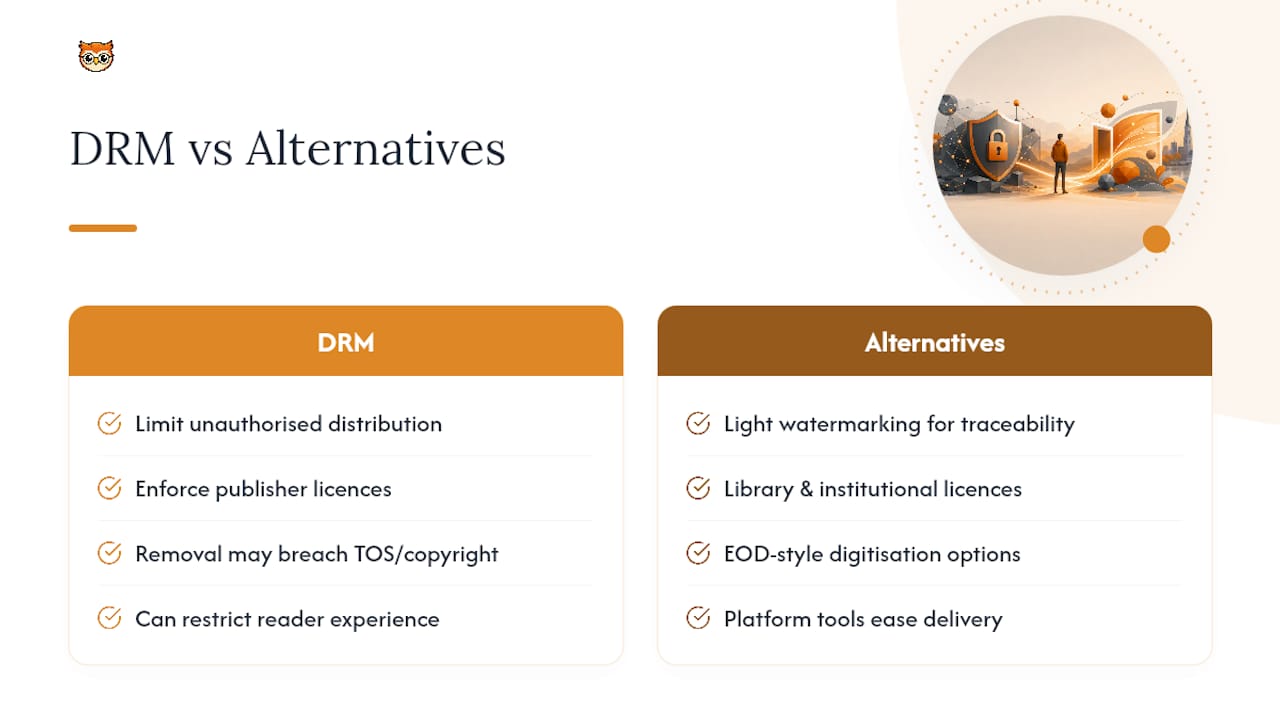
Publishers apply DRM mainly to limit unauthorised distribution and to enforce the licence terms they've agreed with authors, not to annoy readers for its own sake. Removing DRM without permission typically breaches the seller's terms of service and can infringe copyright, so sellers generally can't legally hand out DRM-free copies of titles the publisher has locked.
Alternatives do exist. DRM-free distribution with light watermarking gives creators traceability without the friction. Library and institutional licences, including EOD-style digitisation services, offer another route where terms vary by provider. For creators weighing these trade-offs, platform-level distribution tools matter as much as the protection method itself, since ease of delivery affects the reader experience just as much as the licence does.
Why this matters to us at BibliOWLteca
The delivery infrastructure was built to balance work protection with ease of purchase. Secure digital delivery, flexible watermarking, and creator-controlled access settings all sit under one roof here. Our documentation and support exist precisely because DRM confuses buyers as much as sellers, and clear guidance beats another locked file nobody can open.
— BibliOWLteca
Selling e-books without the DRM headache
Bibliowlteca charges nothing monthly. You only pay when you actually sell, with a transaction fee starting from €0.99 per sale rather than a recurring cost eating into your margins before you've made a single sale.

Unlike traditional publishing routes that lock sellers into rigid DRM systems, the platform allows creators to choose their preferred protection approach when listing an e-book, including watermarking or access controls. Instant digital delivery allows buyers to receive their files promptly after payment, without the need to manage ticket files or authorisations. Browse the e-book category to see how listings look in practice, or head straight to the Creator Plan and set up your storefront today.
Sources
- Digitaalõiguste haldamise (DRM) süsteemid | Anti-Counterfeiting and Anti-Piracy Technology Guide
- Digital Rights Management (DRM) - Digital Books - Research Guides at Virginia Tech
- Digiraamat
FAQ
What Is e-raamatu DRM Exactly?
E-raamatu DRM is a licence control publishers use to restrict how an e-book is copied, shared or opened, usually through encryption or metadata tagging. It doesn't mean you own the file outright; you own a licence to read it under specific conditions.
Can I Remove DRM From an E-Book I Bought?
Removing DRM generally breaches the seller's terms of service and can infringe copyright, even on a title you paid for. Sellers cannot legally provide DRM-free copies when the publisher requires protection, so check the product page for DRM-free options instead.
Why Won't My .acsm File Open?
An .acsm file is a ticket, not the book itself, and it only works inside Adobe Digital Editions or a compatible app. If it fails, check that your Adobe ID is signed in and that your device hasn't exceeded its authorisation limit.
Can I Read Adobe DRM E-Books on a Kindle?
No, Kindle devices don't support Adobe DRM EPUBs by default, so titles bought with that protection generally won't load without conversion. Check the retailer's supported device list before buying if you plan to read on Kindle.
What's the Difference Between Social DRM and DRM-Free?
Social DRM embeds your buyer details invisibly but still lets you copy, print or convert the file freely. DRM-free carries no restriction and no embedded identifying information at all, giving you full flexibility across devices.
Does Bibliowlteca Support DRM-Free E-Book Sales?
Yes, creators on Bibliowlteca can choose watermarking or platform-level access controls when listing e-books, rather than being locked into one protection method. Details on setup are available through the Creator Plan.