
You can validate, build, and sell a webinar-based online course in 4–6 weeks by running a paid pre-sale test, hosting one live webinar, and presenting a clear post-webinar offer. The process is not complicated. What trips most creators up is the order: they build first and sell second, when it should be the other way around.
Three immediate next steps:
- Post a paid sign-up page for a pilot webinar this week (even at £10–£25) to test real demand.
- Set a webinar date within the next 14 days and commit to it publicly.
- Define your core offer: one course, one price, one outcome.
The single KPI to watch in your first four weeks is registration-to-attendee rate. If a low proportion of registrants show up live, your promotion and reminder sequence needs work before you scale spend.
Key takeaways
Selling a webinar-based course in the UK comes down to one repeatable sequence: validate with a paid pilot, run a structured webinar, present a clear offer, and follow up within 48 hours.
| Point | Details |
|---|---|
| Validate before you build | Run a paid pilot (£15–£49 deposit) before building the full course to confirm real demand. |
| Structure the webinar in four segments | Hook, teach, transition, and close; aim for 60 minutes with a clear pitch at the end. |
| Test two price points first | Run your core tier (£247–£397) against a close alternative and measure conversion before scaling. |
| Follow up within 48 hours | The first two post-webinar emails drive the majority of sales; send within one hour and 24 hours of close. |
| Use Bibliowlteca for hosting and payments | The platform covers course hosting, GBP and multi-currency payments, delivery, and analytics in one place. |
Table of Contents
- How do you validate a webinar course idea before you build it?
- How should you structure a webinar that teaches and sells?
- What is the minimal tech stack for hosting and selling webinars in the UK?
- How do you price your course and map the webinar-to-sale funnel?
- How do you fill webinar seats with a small audience?
- How do you deliver the webinar offer and handle objections ethically?
- How do you deliver the course and scale after your first launch?
- UK payments and tax checklist for course creators
- What actually works, and what most creators get wrong
- Bibliowlteca gives you the infrastructure to launch without the technical friction
- Sources
How do you validate a webinar course idea before you build it?
The fastest proof of paying demand is a paid pre-sale, not a free sign-up form. Free registrations tell you people are curious. A modest reservation deposit tells you they will actually pay. Practical training providers consistently recommend small paid pilots over free opt-ins precisely because paying behaviour is the only signal that scales.
Validation checklist:
- Build a single landing page with a paid sign-up option (£15–£49 deposit or early-bird ticket).
- Run a minimum viable webinar: one 60-minute session on your core topic, sold to a pilot cohort of 10–30 people.
- Offer a reservation deposit for the full course, refundable if you do not proceed.
- Collect three data points from every registrant: their email, the outcome they want, and what they have already tried.
Defining your paying audience is equally specific work. Use a jobs-to-be-done frame: what is the person trying to accomplish, what is blocking them, and what have they already bought or tried? A creator who teaches "productivity for freelancers" is vague. One who teaches "how to close client projects each week without working weekends" has a paying audience.
Pro Tip: Write out your ideal buyer's last three Google searches before they found you. If your landing page does not answer those exact searches, rewrite the headline before you run any paid traffic.
How should you structure a webinar that teaches and sells?
The webinar must do two things: build enough credibility that the audience trusts you, and create a clear, time-sensitive reason to buy the paid course immediately after. TalTech's course materials on digital training formats recommend pairing a defined webinar structure with neuro-marketing-informed audience profiling, using outcome-focused language throughout to match subconscious buying cues.
A one-hour webinar works well in four segments:
| Segment | Duration | Purpose |
|---|---|---|
| Hook | 5–10 min | State the problem, who this is for, and what they will leave knowing |
| Teach | 30 minutes | Deliver 3 core insights with examples; build credibility |
| Transition | 5 min | Bridge from free value to the paid next step |
| Close | 15–20 min | Present the course, price, urgency, and Q&A |
The paid course that follows should map to 3–8 modules, each with a single learning objective and one concrete deliverable. Modular design with short, measurable outcomes improves completion and reduces refund requests. A sample outline:
- Module 1: Define your niche and paying audience (deliverable: one-page customer profile)
- Module 2: Build your offer and pricing (deliverable: pricing page draft)
- Module 3: Set up your tech stack (deliverable: live registration page)
- Module 4: Promote and fill your webinar (deliverable: promotion calendar)
- Module 5: Deliver and convert (deliverable: webinar script)
- Module 6: Follow up and close (deliverable: three-email sequence)
The pitch transition is where most creators lose the room. Do not apologise for selling. State plainly: "What I just taught you is the foundation. The course takes you through the full execution, step by step, with my direct support." Then reveal the price, the deadline, and the bonus for acting today.
Pro Tip: Rehearse the transition out loud at least five times before the live session.
What is the minimal tech stack for hosting and selling webinars in the UK?
Use the smallest stack that covers four functions: registration, live delivery, payment processing, and course access. Tech paralysis kills more launches than bad content does.
Recommended feature set to look for:
- Registration page with email capture and automated confirmation
- Live or pre-recorded webinar delivery with replay access
- Secure payment processing in GBP (and ideally multiple currencies for international buyers)
- Automatic course access granted on payment confirmation
- Basic analytics: registrations, attendees, sales
For live webinars, you need a platform that handles concurrent viewers without lag and sends automated reminders. For evergreen webinars (pre-recorded, running on a schedule), the priority shifts to replay gating and email integration.
Registration best practice for a UK audience: send a confirmation email immediately, a reminder 48 hours before, and a final reminder one hour before the session. Include a calendar invite (.ics file) in the confirmation. State the time zone explicitly as GMT or BST, depending on the season, since UK clocks change in late March and late October and this catches creators out every year.
On delivery security: host video behind a login, not on a public YouTube link. Set access expiry rules if your course licence is time-limited. Keep downloadable files in a secure, access-controlled environment rather than a shared Google Drive folder.
Pro Tip: Before your first live session, run a full technical rehearsal with someone else joining as a participant. Test audio, screen share, and the payment link. A broken checkout on the day of a webinar is the most avoidable revenue loss in this business.
How do you price your course and map the webinar-to-sale funnel?
Start with a two-price test: pick two close price points and run them across two small cohorts or separate promotional periods. Measure conversion at each. The structured sales process recommended by sales training practitioners reduces friction and makes revenue repeatable, which is exactly what a tested funnel delivers.
Funnel flow:
- Traffic (organic posts, email list, small paid ads)
- Registration page (clear outcome, one CTA)
- Pre-webinar nurture (two to three emails building anticipation)
- Live webinar (teach, transition, close)
- Cart open (24–72 hour window post-webinar)
- Post-webinar follow-up (three-email sequence to non-buyers)
Pricing tier ideas:
- Entry tier (£97–£197): Core course content only, self-paced, no live support
- Core tier (£247–£397): Course plus group Q&A calls or community access
- Premium tier (£497–£997): Course plus one-to-one coaching sessions or done-with-you elements
Test the core tier first. It is the easiest to sell because it balances value and price without requiring you to deliver intensive one-to-one time before you have refined the material.
Key metrics to track:
- Registration rate (visitors to registration page who sign up): aim for about a quarter to two-fifths
- Attendance rate (registrants who attend live): aim for roughly two-fifths to three-fifths
- Conversion rate (attendees who buy): aim for a low to mid teens percentage on a first launch
- Average order value: track this across tiers to see which upsells work
How do you fill webinar seats with a small audience?
Profitable attendee acquisition mixes your existing organic audience, your email list, and a small paid ads test if budget allows. You do not need a large following. You need a focused one.
Promotion checklist:
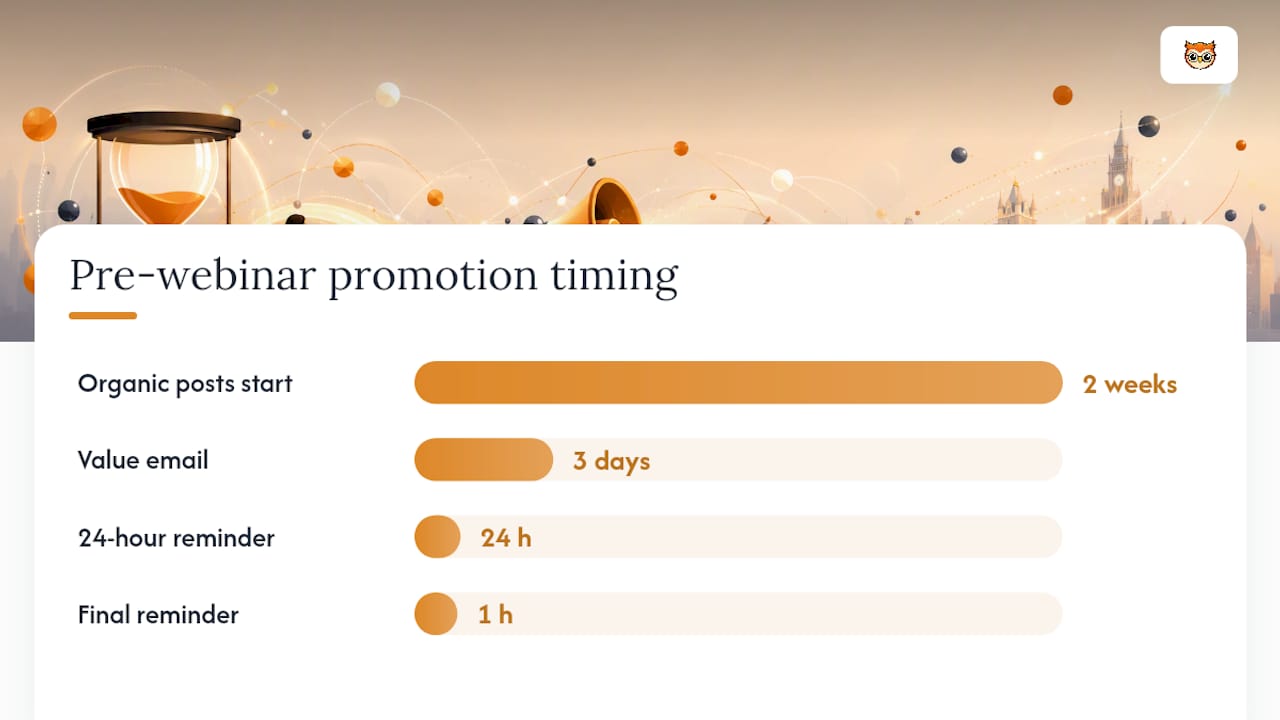
- Post several organic pieces of content in the two weeks before the webinar (short video, carousel, or written post on the platform where your audience lives)
- Email your list at least three times: announcement, reminder, last-chance
- Reach out to two to three complementary creators or communities for a cross-promotion or affiliate arrangement
- If running paid ads, start with a small daily budget on a single platform targeting a specific interest or lookalike audience; do not spread budget across multiple channels on a first launch
Email sequence for pre-webinar engagement:
- Registration confirmation (immediate): confirm the date, time, and what they will learn; include calendar invite
- Value email (3 days before): share one useful insight related to the webinar topic to build anticipation
- Reminder (24 hours before): restate the outcome, add social proof if available
- Final reminder (1 hour before): short, direct, with the join link prominent
For creators with small lists, the highest-leverage tactic is a collaboration with someone who already has your audience. Offer to run a free 20-minute session inside their community in exchange for a mention of your paid webinar. Short-form video repurposed from your webinar content (clips, key takeaways) also drives registrations at near-zero cost.
Pro Tip: Post the webinar registration link in your email signature and social bio two weeks before the event. Passive placements like these consistently account for a measurable share of sign-ups with zero additional effort.
How do you deliver the webinar offer and handle objections ethically?
Execute the offer clearly: state the problem your audience has right now, show evidence that your course addresses it, present the solution with a specific price, and give a deadline. Practical masterclass formats used by creators across Europe consistently follow this pattern because it works without pressure tactics.
Webinar pitch script template:
| Element | What to say |
|---|---|
| Headline | "Here is what I want to offer you today, and why now is the right time." |
| Social proof | One specific result: "A previous student completed this and [concrete outcome]." |
| Course overview | Three bullet points: what they get, how it is delivered, how long it takes |
| Price reveal | State the price plainly, then explain what it includes |
| Urgency | Enrolment closes [date] or bonus expires [date]; be honest about why |
| CTA | "Go to [URL] now and secure your place." |
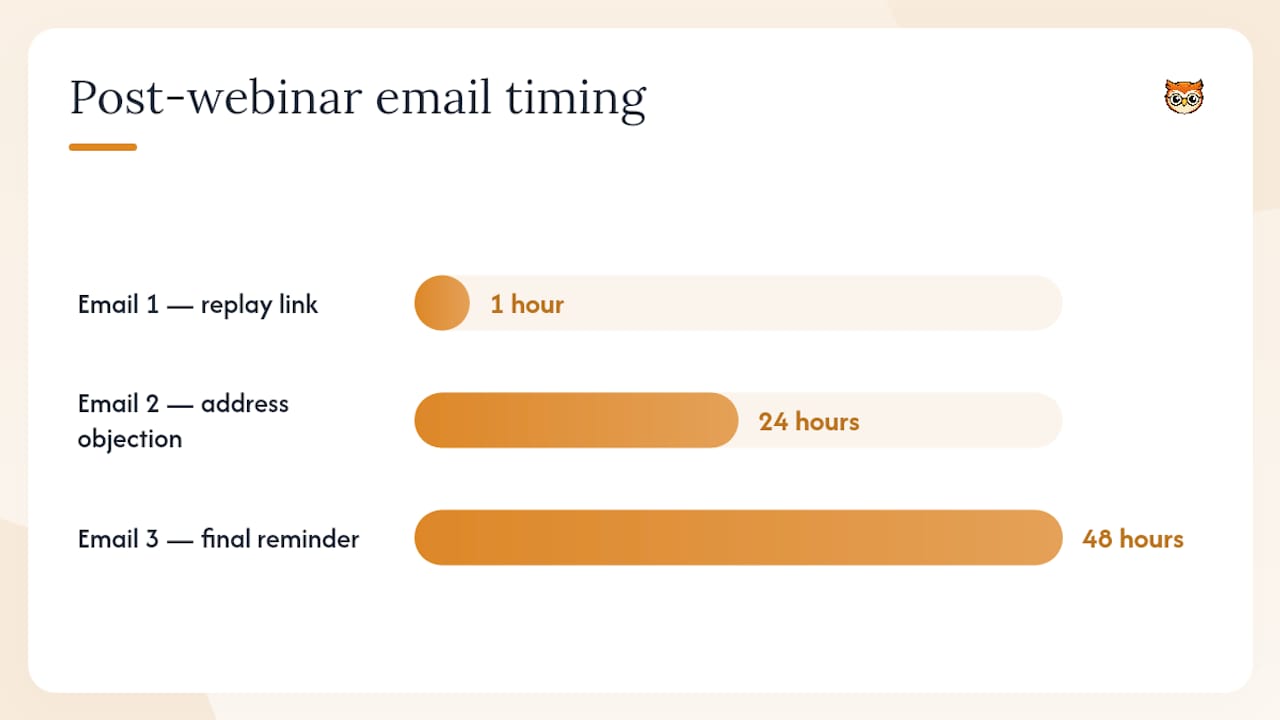
Post-webinar email cadence (first 48 hours matter most):
- Email 1 (sent within 1 hour of webinar ending): replay link, course link, deadline reminder
- Email 2 (24 hours later): address the most common objection you heard in the Q&A
- Email 3 (48 hours later, or the morning of cart close): final reminder, emphasise what they will miss
Common objections and short ethical responses:
- "I don't have time right now." Acknowledge it, then ask: "When will you have time? The course is self-paced and designed for 2–3 hours per week."
- "It's too expensive." Break it down: "That's £X per module, or less than a single coaching session."
- "I need to think about it." Respect it: "Totally fair. The cart closes on [date]. Here is the link when you are ready."
Pro Tip: Record every objection you hear live or receive by email after the webinar. Address those five directly in your pitch and follow-up emails.
How do you deliver the course and scale after your first launch?
Deliver a simple onboarding within 24 hours of purchase. Clear course access, a welcome message, and a first action step reduce refund requests and build the goodwill that generates testimonials for your next launch. Prioritising the first seven days of a learner's experience reduces churn and improves the quality of feedback you collect for iteration.
Onboarding checklist:
- Send a welcome email with login details and a direct link to Module 1 within one hour of payment
- Include a "start here" page inside the course with three bullet points: what to do first, where to ask questions, and how to get the most from the material
- Set up a community space (a private group or a simple Q&A thread) and post a welcome message
- Schedule one live Q&A call in the first two weeks for cohort-based courses
Scaling options after proof of concept:
- Convert the live webinar into an evergreen funnel (pre-recorded, automated email sequence, always-on cart)
- Run a second cohort launch four to six weeks after the first, using testimonials from cohort one
- Add a partnership or affiliate programme: offer 20–30% commission to complementary creators who promote your course
- Test paid acquisition once you have a proven conversion rate; a funnel converting at 10% live can often sustain paid traffic profitably
Use completion rates, NPS scores, and refund reasons to improve each launch. Fix that before you scale.
UK payments and tax checklist for course creators
You must understand VAT thresholds, invoicing requirements, and how refunds affect your net revenue before you take your first payment. This is a general overview; consult HMRC or a qualified accountant for advice specific to your situation.
Key regulatory note: The UK VAT registration threshold for taxable turnover is currently £90,000 per year. If your course sales remain below this threshold, you are not required to register for VAT. However, if you sell digital services to consumers in other countries, different rules may apply depending on the destination country's regulations. Always verify the current threshold directly with HMRC before making decisions, as thresholds can change.
Payments and tax checklist:
- Check whether your annual taxable turnover from digital sales exceeds the VAT registration threshold; register with HMRC if it does or is likely to
- Display prices inclusive of VAT on your sales pages once registered; failing to do so is a common compliance error
- Issue a VAT invoice for every sale if you are VAT-registered; include your VAT number, the buyer's details, and the tax amount
- Offer a clear refund policy; UK consumer law gives buyers 14 days to cancel a digital product purchase unless they have explicitly waived that right by starting the download or accessing the content
- Keep records of every digital sale: date, amount, buyer location, and payment method; HMRC requires these for at least six years
- If selling to EU consumers, check whether you need to register for VAT in those countries or use the UK's VAT One Stop Shop equivalent scheme
For creators selling digital products in the UK, the practical priority is getting your invoicing and refund policy right from day one. Retroactive compliance is far more painful than setting it up correctly at launch.
What actually works, and what most creators get wrong
The most common mistake is launching without a paid validation. Creators spend six to eight weeks building a course, then discover that nobody will pay the price they imagined. The second most common mistake is an overcomplicated tech stack: three tools that do not talk to each other, a broken checkout, and a webinar platform that crashes on the day.
From our perspective at Bibliowlteca, the creators who succeed fastest share one habit: they treat selling as a trainable skill rather than a personality trait. Sales confidence is built through small, consistent practice, not through one high-pressure launch. Rehearsing your pitch, sending follow-up emails even when it feels uncomfortable, and asking directly for the sale are all learnable behaviours.
The creators who struggle tend to wait for the "perfect" launch: a bigger list, a better course, a more polished slide deck. The ones who grow run a scrappy first cohort, collect feedback, and improve. A £500 first launch with ten paying students is not a failure. It is the data you need to make the second launch worth £5,000.
Pro Tip: Treat your sales pitch like a skill you practise weekly, not a performance you deliver once a quarter. Even five minutes of rehearsing your transition and close, out loud, before each webinar compounds into noticeably better conversion within three months.
Bibliowlteca gives you the infrastructure to launch without the technical friction
Most creators do not need more tools. They need fewer, better-connected ones. Bibliowlteca provides course hosting, secure global payments, digital delivery, and basic analytics in a single platform, removing the integration headaches that derail first launches.

The platform's creator features map directly to every step in this guide: you can host your webinar course content with video and quizzes, set up a customisable storefront, accept payments in GBP and multiple other currencies, and track sales and access from one dashboard. For creators selling into the UK and beyond, the multi-currency support means you are not leaving international revenue on the table. You can also list digital marketing courses and related products alongside your webinar offer, creating a simple product catalogue without building a separate website.
Getting started takes three steps: create your course product, set your price and tier structure, then connect your payment method and publish. From there, your webinar offer is live and ready to take sales. Visit Bibliowlteca to see the full platform and start your first listing today.
Sources
These are starting points for further reading and fact-checking. They are not a substitute for professional legal, tax, or financial advice. For VAT registration, invoicing rules, and digital sales compliance, consult HMRC directly or speak with a qualified accountant.
Sales psychology and creator training:
- Tallinna Tehnikaülikool course page (digital training formats and marketing)
- Uus vaatenurk müügile: kuidas sisemine julgus kasvatab tulemusi ja võimalusi – Äripäeva E-pood
- Müügitunnelite koolitusõhtu: Kuidas luua süsteemselt igakuine tulu 10 000+ eurot ilma müügipaanikata - Veebikool
- Müügimasina Meistriklass (LIVE kursused + salvestused + kontaktid) - Fienta
Course design and funnel structure:
Platform features and UK digital sales:
UK tax and compliance: