

Build the payment-triggered onboarding and access sequence first. The moment a learner pays, they should get a welcome email, an access grant, and a clear next step, with no manual work on your end. This single workflow cuts enrolment admin dramatically and gets students engaging with course content in minutes rather than days. Once that's running, the rest of your e-posti automatsiooni kursustele setup builds outward from it, as the next section shows.
TL;DR:
- The first automation to set up should be a payment-triggered onboarding sequence that grants access and starts engagement immediately after payment.
- Use specific webhooks from your marketplace platform to automate access control, confirmation emails, and payment updates, minimizing manual tasks.
- Regularly test each segment of your automation with small sample accounts to diagnose issues early and ensure smooth learner experiences.
- Incorporate advanced content like quizzes, feedback surveys, and certification offers to boost learner engagement beyond initial onboarding.
- Maintain email deliverability by configuring SPF, DKIM, and DMARC protocols, and keep data protection practices aligned with GDPR standards.
Table of Contents
- Common email automation workflows for online courses
- How do you map an automation before building it?
- Which tools integrate with course platforms?
- Deliverability, list hygiene, and data protection
- How do you measure and optimise automation performance?
- How does a course marketplace fit into your automations?
- Beyond welcome emails: quizzes, feedback, and certificates
- When automation helps, and when it doesn't
- Selling and delivering automated courses through Bibliowlteca
- Sources
- FAQ
Common email automation workflows for online courses
Most course creators run a handful of email automation courses through their heads before picking a workflow, but five patterns cover nearly every situation. Each one solves a different problem, and the trigger you choose determines how well it works.
- Welcome and onboarding: fires immediately after signup or payment, explains what happens next, and sets expectations for pacing and support.
- Drip lessons: released on a fixed schedule (every Monday) or gated by progress (finish Lesson 2 to unlock Lesson 3). Fixed drips suit cohort-based courses; progress-based drips suit self-paced learners who move at their own speed.
- Session reminders: calendar invites plus a reminder sent 24 hours and again 1 hour before a live session, cutting no-shows.
- Payments and receipts: a webhook confirms payment, triggers a receipt email, and gates access to paid content automatically.
- Re-engagement and completion: nudges inactive learners after a set number of quiet days, then triggers a certificate or completion email once the final module closes.
Each of these is a candidate for email campaign automation built around your actual funnel, not a generic template borrowed from an unrelated business.
How do you map an automation before building it?
Sketch the journey on paper before opening any tool. Write down the exact moment something should happen (the trigger), what happens as a result (the action), and every fork where behaviour splits (the branch). Course modules on lifecycle automation treat this trigger, action, and branching structure as the operational backbone of any workflow, and skipping it is why so many sequences break silently.
- Identify the trigger event precisely: "payment succeeded" is not the same as "checkout started".
- List every action and data point the trigger needs: tags, custom fields, access permissions, timestamps.
- Design branches for common behaviours: did they click the welcome email or not? Did they finish Module 1 within 7 days?
- Build a test plan: run the whole sequence through a dummy account before it touches a real learner.
Pro Tip: Test each block of your sequence separately with a small cohort of two or three test accounts before connecting the next block. Compounding errors across a five-step automation are far harder to diagnose than one broken link.
Keep a rollback step ready. If a branch misfires, you need a manual override that removes the wrong tag or regrants access without waiting for support tickets to pile up.
Which tools integrate with course platforms?
Four categories cover almost every setup: email service providers (ESPs) for the sending itself, workflow automators (middleware) that connect apps together, your LMS or platform's own webhooks, and CRMs or AI assistants that add context or drafting help.
Integration happens three ways. A plugin is the simplest, built for one specific platform pairing, but limited to what the plugin author decided to support. A direct webhook connection is flexible and fast but requires someone comfortable reading API documentation. Middleware sits in between, letting non-developers wire triggers to actions visually. No-code tools such as Make.com are widely used in hands-on workshops precisely because they connect forms, email systems, and AI modules without writing code.
Before connecting anything, confirm:
- Which data fields the platform actually sends on each event
- Whether payment webhooks fire on success only, or also on refunds and disputes
- Rate limits on your ESP and middleware tier
- Whether a sandbox or test mode exists
If your workflow needs conditional logic across three or more systems, or handles sensitive learner data, bring in a developer. Simple linear sequences are usually fine on no-code connectors alone.
Deliverability, list hygiene, and data protection
None of this matters if your emails land in spam. Authentication protocols and clean lists are treated as non-negotiable groundwork by every serious email marketing courses programme, and for good reason.
- SPF, DKIM, and DMARC verify your domain isn't being spoofed and that mail servers trust your sending address. Check all three are configured before your first automated sequence goes live.
- Double opt-in confirms genuine interest and keeps bounce rates low.
- Suppression rules stop you emailing people who've unsubscribed or bounced repeatedly.
- GDPR essentials: keep a record of when and how each learner consented, define a retention period for their data, and make sure your platform can delete it on request. Bibliowlteca's GDPR checklist for course sellers walks through the specific records you need to keep.
Run a small test batch before scaling any sequence. A five-minute check now avoids a mass-bounce event later.
How do you measure and optimise automation performance?
Four numbers tell you almost everything: open rate, click-through rate, conversion to course activity or payment, and sequence drop-off. Data-driven segmentation, separating cold leads from paying students, prevents the irrelevant messaging that quietly tanks all four, a point HubSpot Academy's lifecycle lessons makes repeatedly.
- Run A/B tests on subject lines and send times with small batches. You don't need thousands of subscribers, just enough to compare two versions honestly.
- Diagnose drop-off by stage: a spike after email 2 often means the CTA is unclear, not that interest has died.
- Do a weekly QA pass: trigger accuracy, an inbox check on your own test account, and one full walkthrough as a student.
Pro Tip: If your open rate looks healthy but clicks are flat, the problem is almost never the subject line. It's usually the call-to-action buried three paragraphs in.
How does a course marketplace fit into your automations?
A marketplace platform gives you the raw triggers your workflows need without custom backend work. The practical mappings are straightforward: purchase succeeds, triggers grant-access and starts the onboarding sequence; a refund fires, revokes access and notifies you as admin; a subscription cancels, pauses future drip emails.
- Purchase webhook: fires the moment payment clears, carrying order metadata you can use for tagging.
- Payment status field: distinguishes "paid", "refunded", and "pending" so your branching logic doesn't guess.
- User access API: grants or revokes lesson access without a manual click.
Marketplaces that expose these events clearly, payment webhooks and order metadata among them, save creators from building custom infrastructure just to fire a welcome email. Bibliowlteca's course access control guide covers the specific levers for gating lessons by purchase or progress.
Beyond welcome emails: quizzes, feedback, and certificates
Most course creators stop building sequences once the welcome email and drip lessons are live, which leaves real engagement opportunities untouched. Three content types consistently outperform generic "check-in" emails.
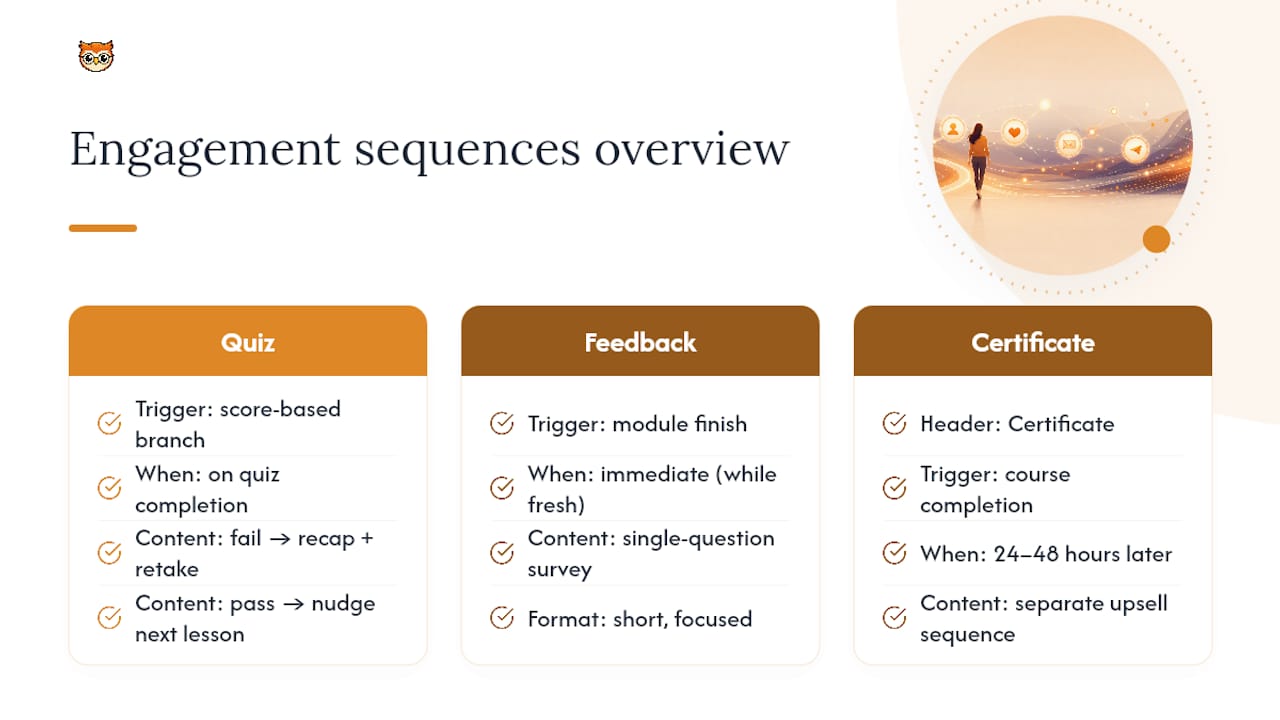
Quiz-triggered emails fire based on a learner's score. Someone who fails a module quiz gets a supportive email with a recap resource and an offer to retake; someone who scores well gets a nudge straight into the next lesson. This branch alone can rescue learners who'd otherwise quietly drop off after a bad result.
Feedback requests work best timed to a specific moment, not a calendar date. Send it the moment someone finishes a module, while the material is fresh, rather than in a generic weekly digest. Short, single-question surveys ("What was unclear in this lesson?") get far higher response rates than long forms.
Certification offers deserve their own sequence, separate from the completion email. A learner who finishes your course is warm for an upsell: a certificate, a badge for LinkedIn, or an invitation to an alumni community. Time this 24 to 48 hours after completion, once the sense of accomplishment is still fresh, rather than bundling it into the same email that confirms they've finished.
None of these need to be complicated. A single branching rule (quiz score above or below a threshold) and one well-timed send is enough to turn a passive completion into an active recommendation.
When automation helps, and when it doesn't
Automate the administrative layer first: onboarding, reminders, access grants, receipts. That's where automation earns its keep with zero downside. Feedback and assessment are different. A learner struggling with a concept needs a human reading their actual answer, not a templated reply. A sensible rule: automate everything repeatable, then schedule fixed weekly slots for personal check-ins with learners who show signs of stalling. That balance keeps your course scalable without making it feel hollow.
— BibliOWLteca
Selling and delivering automated courses through Bibliowlteca
The commerce infrastructure needed for this article's workflow typically includes a storefront, global payments, and access control tied directly to purchase events, so you avoid stitching together three separate tools just to gate a lesson.

A practical starter plan: check what your marketplace listing needs before publishing, review the pricing structure to pick the right plan for your sales volume, then look at the feature set to confirm which webhooks and access-control options are available before you build your first onboarding sequence. Multi-currency receipts and built-in delivery tools mean the payment and access parts of your automation are already solved, leaving you to focus on the email content itself. Start by listing your first course on Bibliowlteca and testing the onboarding flow with a sandbox purchase before opening it to real students.
Sources
For deeper study, Coursera's lifecycle automation course and its AI and email specialisation both cover workflow design in more depth. For hands-on middleware practice, Estonian workshops on Make.com walk through real builds. For drafting help, tools like the AI email generator from AmmarAI speed up subject line and copy testing.
FAQ
What Is the First Automation I Should Build?
A payment-triggered onboarding and access sequence, fired the moment a learner pays, is the single highest-impact automation for course creators to set up first.
How Many Emails Should a Welcome Sequence Have?
A typical welcome sequence includes a few emails covering setup, first-lesson guidance, and pacing expectations, but sending too many might reduce learner attention before the course content starts.
Do I Need SPF, DKIM, and DMARC for a Small Course List?
Yes. All three protect your sender reputation regardless of list size, and skipping them is a common cause of automated sequences landing in spam.
Can I Automate Without Coding Knowledge?
Yes, no-code middleware such as Make.com connects forms, email systems, and course platforms without writing code, and platforms like Bibliowlteca expose webhooks that plug into these tools directly.
How Often Should I Review My Automation Performance?
Run a weekly QA pass checking trigger accuracy and a full student walkthrough, alongside a monthly review of open rates, click rates, and drop-off points across your sequences.