
Marketplace platforms send creator payouts as direct bank transfers or payment-provider transfers (PayPal, Stripe, and similar services), typically reaching your account within 1–7 business days after a payout run, net of platform and processor fees. The single most important regulatory date to know: under the Platform Operators (Due Diligence and Reporting Requirements) Regulations 2023, platforms must give you a copy of your reported seller information by 31 January following the end of each calendar year.
Common payout channels and typical frequencies:
- Bank transfer (Faster Payments, BACS, or SEPA for international): weekly or monthly, subject to a minimum threshold
- PayPal or Stripe: often faster clearing, sometimes daily or on-demand above a minimum balance
- Third-party payment providers: timing varies by provider and platform configuration
The 31 January seller-report deadline is not just a platform admin task. HMRC uses those reported figures to cross-check your tax return, so the document the platform sends you is effectively your primary income evidence for Self Assessment.
Key takeaways
Platforms must report your gross sales to HMRC and give you a copy of that report by 31 January; treat it as your primary income document for Self Assessment.
| Point | Details |
|---|---|
| Seller report deadline | Platforms must provide your copy of reported income by 31 January following each calendar year. |
| Reconcile monthly, not annually | Match payout CSVs to bank credits each month so January filing is a confirmation, not a discovery. |
| Self Assessment dates | Notify HMRC by 5 October; file and pay by 31 January; second payment on account by 31 July. |
| Gross vs net | Platforms report gross sales to HMRC; fees are deductible expenses you record separately. |
| Bibliowlteca | Provides multi-currency payouts, itemised monthly statements, and the annual seller report by the statutory deadline. |
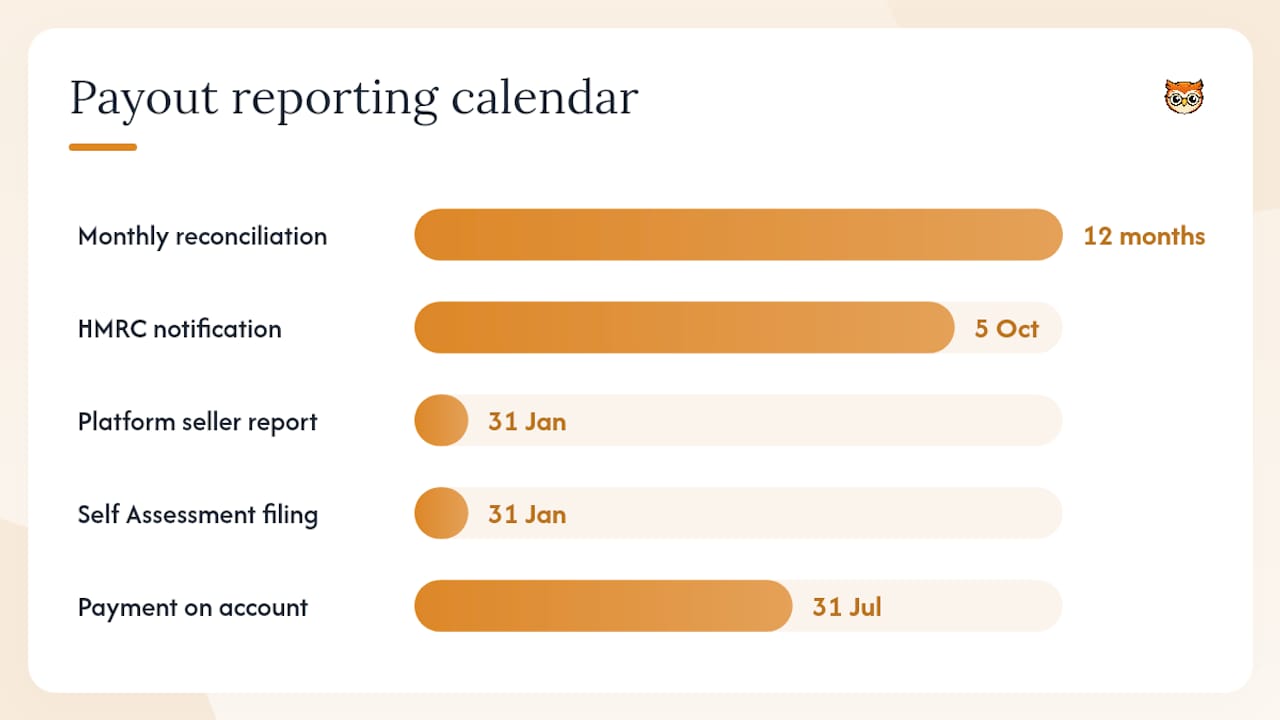
Table of Contents
- How do platforms actually move your money?
- What UK rules affect your payouts and reporting?
- What you must do: recordkeeping, reconciliation and tax prep
- How to set up and check your marketplace payout details
- What to do when a payout is late, wrong, or missing
- Key payout and reporting terms you need to understand
- How does Bibliowlteca handle payouts and tax reporting?
- Why transparent payouts and structured reporting matter
- Sell your digital products with built-in payout tools
- Official resources to bookmark
- Sources
How do platforms actually move your money?
The journey from a completed sale to cash in your account has several stages, and each one can add time or reduce the amount you receive.
Most platforms batch payouts on a fixed schedule: daily, weekly, or monthly. A sale completed on Monday may not enter a payout run until the following Friday, and bank clearing (especially for BACS) can add another 1–3 business days on top. Payouts may be delayed if your balance has not reached the platform's required minimum threshold.
Payment processing for creators involves several layers of deduction before the net figure lands in your account:
- Platform transaction fee: a percentage of gross sale value plus, often, a fixed amount per transaction
- Payment processor fee: charged by the underlying payment provider (Stripe, PayPal, or similar) and usually passed through to the creator
- Refunds and chargebacks: held back from the current payout or deducted from a future one
- Dispute reserves: some platforms hold a small percentage temporarily when a dispute is open
| Payout method | Typical timing after payout run | Fee shape |
|---|---|---|
| Faster Payments (UK bank) | Same day to 1 business day | Low fixed fee or none |
| BACS (UK bank) | 1–3 business days | Low fixed fee or none |
| SEPA (EU bank) | 1–2 business days | Small fixed fee |
| PayPal | Minutes to 1 business day | Percentage plus fixed fee |
| Stripe (instant payout) | Minutes to 2 hours | Percentage fee applies |
The Payment Services Regulations 2017 govern how payment service providers operate in the UK, setting authorisation and conduct requirements enforced by the FCA. That regulatory layer is why platforms use approved payment flows rather than ad hoc transfers.
Pro Tip: On any payout statement, find the "gross sales" line first, then subtract "platform fees", "processor fees", and "refunds" to arrive at "net payout". If those four lines do not reconcile to the bank credit, check for a dispute reserve or currency conversion charge on a separate line.
VAT adds another layer. Marketplaces that process sales may carry VAT accounting obligations in specific circumstances, and overseas sellers supplying UK customers may need to charge and account for UK VAT. Check whether your platform handles VAT on your behalf or whether you must account for it separately.
What UK rules affect your payouts and reporting?
Two pieces of legislation shape how platforms handle your money and your data.
The Platform Operators (Due Diligence and Reporting Requirements) Regulations 2023 implement the OECD model rules in the UK. They require platforms to carry out due diligence on sellers, keep records of that due diligence, and report specified seller information to HMRC for each calendar year. Crucially, the platform must also give you a copy of that reported information by 11:59pm on 31 January following the end of the reportable period.
Not every seller is reportable. A small-seller exclusion applies where a seller completes fewer than 30 sales and receives 2,000 euros or less in the calendar year. If you exceed either threshold, you are a reportable seller and the platform will include your data in its HMRC submission.
The Payment Services Regulations 2017 set the framework for payment services in the UK. The FCA authorises or registers payment service providers under these regulations, which is why platforms must use FCA-approved payment flows for UK transactions.
Self Assessment deadlines to map to your platform report:
- 5 October: notify HMRC that you need to complete a Self Assessment return for the previous tax year
- 31 January: file your return and pay any tax owed; also the deadline by which the platform must send you your seller report
- 31 July: second payment on account where applicable
Pro Tip: The platform's annual seller report covers the calendar year (1 January to 31 December), but the Self Assessment tax year runs 6 April to 5 April. You will need to split or apportion figures across two tax years when reconciling.
What you must do: recordkeeping, reconciliation and tax prep
Start this process monthly, not in January. Waiting for the annual seller report to begin bookkeeping is the single most common mistake creators make.
- Download monthly payout statements from your creator dashboard as soon as they are available.
- Export payout CSVs covering gross sales, fees, refunds, and net amounts for each period.
- Record all fees and refunds in your bookkeeping tool or spreadsheet, tagged by date and transaction ID.
- Capture invoices and receipts for any platform-related expenses you intend to claim.
- Download your annual seller report by 31 January and compare gross sales figures to your running total.
Reconciliation works in three steps: match the gross sales figure in the platform's annual report to the sum of your monthly statement totals; reconcile fees and refunds to confirm the net payout figure; then match that net figure to the actual bank credits on your statements. Any gap usually points to a currency conversion, a dispute reserve, or a timing difference spanning two payout periods.
HMRC expects platform-reported figures to be usable for cross-checking your tax return. Treat the seller report as your primary income document, not a secondary check. Grant Thornton's guidance for content creators notes that HMRC has broadened its data-exchange activity since January 2025, increasing visibility across monetisation types.
Pro Tip: Keep a simple spreadsheet with columns for: platform sale ID, sale date, gross amount, platform fee, net payout, payout date, and bank transaction reference. That single sheet makes any HMRC query a 10-minute exercise rather than a two-day archive search.
How to set up and check your marketplace payout details
Getting paid requires more than adding a bank account number. Platforms carry identity-verification obligations under the 2023 Regulations, so expect a structured onboarding process.
- Log in to your creator dashboard and navigate to the Payout Settings or Payments section.
- Add your bank account details (sort code and account number for UK accounts) or connect your PayPal or Stripe account.
- Complete identity verification: most platforms require a government-issued photo ID and proof of address dated within three months.
- Enter your tax identification details where prompted (National Insurance number or UTR for UK sole traders).
- Select your preferred payout currency and confirm your minimum payout threshold.
- Save settings and trigger a test payout if the platform offers one.
Documentation the platform will typically request: valid passport or driving licence, recent utility bill or bank statement, and bank account proof (a voided cheque or bank letter). For business accounts, you may also need a Companies House registration number.
Platforms using FCA-authorised payment service providers under the Payment Services Regulations 2017 are required to verify your identity before processing payouts. This is a regulatory obligation, not optional platform policy. Completing verification promptly removes the most common cause of delayed first payouts.
Screenshot your completed payout settings page and save it alongside your annual seller report. If a dispute arises about your registered bank details, that screenshot is your evidence.
What to do when a payout is late, wrong, or missing
Check the obvious before escalating. A missing payout is most often a minimum-threshold shortfall, a failed bank verification, or a hold placed on a disputed transaction.
Immediate checks:
- Confirm the sale status in your dashboard (completed, not pending or refunded)
- Check your payout statement for any hold, reserve, or dispute flag on that transaction
- Check your bank or payment provider for an incoming transfer or rejection notice
Escalation steps:
- Gather your evidence: platform transaction ID, payout statement showing the expected amount, and your bank statement showing no corresponding credit.
- Contact platform support with: the transaction ID, the expected payout date, the expected net amount, and your bank details as registered.
- If the platform confirms the payout was sent but your bank shows nothing, contact your bank or payment provider with the platform's payment reference.
- If the dispute remains unresolved, escalate to the FCA-regulated payment provider directly, citing the Payment Services Regulations 2017 complaint procedure.
Evidence to keep for disputes and HMRC queries:
- Transactional export (CSV) from the platform
- Your copy of the annual seller report
- Bank statements showing net receipts
- All written communication with platform support, including timestamps
Pro Tip: Create a folder labelled by tax year (e.g. "2025 Payout Disputes") and drop every dispute email, platform screenshot, and bank rejection notice into it. When the annual seller report arrives in January, you can reconcile disputes against reported figures in one sitting.
Key payout and reporting terms you need to understand
These are the terms that appear on platform statements and in the HMRC seller report. Knowing what each one means stops you from misreading your income.
- Gross sales: the full amount a buyer paid, before any deductions. This is the figure platforms report to HMRC.
- Platform transaction fee: the percentage (and often fixed amount) the marketplace deducts from each sale.
- Payment processor fee: the charge from the underlying payment provider, separate from the platform fee.
- Net payout: gross sales minus platform fee, processor fee, and any refunds or reserves. This is what reaches your bank.
- Refund / chargeback: a reversal of a completed sale, deducted from your payout balance.
- Reporting period: the calendar year (1 January to 31 December) covered by the platform's HMRC report.
- Reportable seller: a seller whose sales exceed the small-seller threshold and whose data the platform must include in its HMRC submission.
- Excluded seller: a seller below the threshold (fewer than 30 sales and 2,000 euros or less) who is not included in the platform's HMRC report for that year.
- XML schema: the structured file format platforms use to submit reports to HMRC, with monetary values as whole numbers and data grouped quarterly within the annual file.
The platform reports £100 as gross sales to HMRC. Your Self Assessment income figure is £100; the fees are deductible expenses.
How does Bibliowlteca handle payouts and tax reporting?
Bibliowlteca is built so that payout mechanics and HMRC reporting requirements sit inside the same platform, rather than requiring creators to stitch together separate tools.
Payout-related features on Bibliowlteca:
- Multi-currency payouts supporting global sales from a single creator account
- Downloadable payout CSVs from the creator dashboard, covering gross sales, fees, refunds, and net amounts
- Annual seller report aligned to the HMRC reporting calendar, provided to creators by the statutory 31 January deadline
- Clear fee breakdowns on every statement so gross-to-net reconciliation is straightforward
- Dashboard statements structured to mirror the quarterly grouping used in the HMRC XML report format
Getting started with payouts on Bibliowlteca:
- Go to your creator dashboard and open Payout Settings.
- Add and verify your bank account or payment provider.
- Select your preferred currency and minimum payout threshold.
- Download a sample payout statement to confirm the format before your first payout run.
- Check the Reports section in January for your annual seller report.
Bibliowlteca uses FCA-authorised payment flows where required under the Payment Services Regulations 2017, and provides the seller copy of any HMRC report by the statutory deadline. The features page covers the full payout and reporting toolkit in detail.
Pro Tip: *Download your Bibliowlteca payout CSV at the end of each month and import it into your bookkeeping tool immediately.
Why transparent payouts and structured reporting matter
Creators sometimes view identity verification and annual reporting as administrative friction. From where Bibliowlteca sits, they are the opposite: they are the infrastructure that makes payouts predictable and tax filing manageable.
HMRC's platform reporting regime is explicitly designed so that seller figures can be matched across jurisdictions and cross-checked against tax returns. That means the data your platform collects and reports is not a bureaucratic exercise. It is the document HMRC will use to verify your income. A creator whose platform figures match their Self Assessment return faces a straightforward filing. One whose figures diverge faces questions.
Clear records also improve cash-flow predictability. When you know exactly what gross sales, fees, and refunds look like each month, you can forecast your net payout with reasonable accuracy and set aside the right amount for tax without waiting until January to find out what you owe. Regular statements and downloadable reports are not a nice feature. They are what separates a creator business from a creator hobby, in HMRC's eyes and your own.
Sell your digital products with built-in payout tools
Creators who sell on Bibliowlteca get payout processing, fee transparency, and HMRC-aligned annual reporting inside a single platform, without needing separate accounting software just to understand what they earned.

The platform handles multi-currency payouts, provides downloadable statements every month, and delivers your annual seller report by 31 January, the statutory deadline. Fee breakdowns are itemised on every statement, so reconciling gross sales to net bank receipts takes minutes rather than hours. Onboarding is straightforward: add your bank details, verify your identity, set your payout preferences, and your first payout runs on the next scheduled cycle.
Visit the Bibliowlteca marketplace to set up your creator account and check payout settings, or review the full features and payment tools to see how reporting and payouts work together.
Official resources to bookmark
- Reporting rules for digital platforms: HMRC's overview of which platforms must report and what seller data they must collect
- Submit your digital platform report: confirms the 31 January deadline and the requirement to provide sellers with a copy
- Create a digital platform report: XML schema, business rules, and example files for platform operators
- The Platform Operators (Due Diligence and Reporting Requirements) Regulations 2023: the primary legislation governing platform due diligence and seller reporting
- The Payment Services Regulations 2017: the UK regulatory framework for payment service providers and FCA authorisation
- Self Assessment tax returns overview: notification and payment deadlines for sole traders and creators
- VAT and online marketplaces: marketplace VAT obligations and seller responsibilities
- Check if you need to register as a digital platform operator: thresholds, exclusions, and small-seller rules
This article is general information, not a substitute for advice from a qualified financial advisor. Consult a qualified financial professional about your own circumstances before acting on anything here.
Sources
- Gov
- Gov
- The Platform Operators (Due Diligence and Reporting Requirements) Regulations 2023
- The Payment Services Regulations 2017
- Gov
- Gov