
TL;DR:
- Creating a single, searchable reference library with consistent metadata and tagging speeds source retrieval to under ten seconds. Using a unified system for ingesting, cleaning, and tagging sources streamlines research workflows and supports automation, saving time and reducing errors. Maintaining the library regularly enhances credibility, simplifies content updates, and becomes a valuable asset for any creator.
Start here: create one searchable reference library, pick a single citation style (APA, MLA, or Chicago), and tag everything with a 'To cite' label before you export. That three-step foundation is what separates a creator who spends twenty minutes hunting for a source from one who retrieves it in under ten seconds.
The quick-start plan:
- Choose your reference manager and open a new library
- Import all existing sources in one batch
- Apply a 'To cite' tag to anything you plan to cite
- Export a sample bibliography to confirm your chosen style works end-to-end
Fragmented storage — sources split across desktop folders, browser bookmarks, and email attachments — is the single biggest time-waster. One canonical library fixes it.
Table of Contents
- Set this up in an afternoon
- How to choose a citation style and what the examples look like
- Why one source-of-truth library changes everything
- How automation saves you hours on metadata
- Collections and tags: a taxonomy you can copy today
- Filename conventions that make retrieval instant
- Export, backup, and migration: what to keep and when
- UK attribution, licensing, and copyright basics
- How to present references inside ebooks, courses, and digital products
- How to keep your reference library accurate over time
- How to handle multilingual and non-English references
- How to cite non-traditional sources: websites, interviews, and datasets
- Key takeaways
- Why a clean reference system is a business asset, not just good practice
- Bibliowlteca makes it straightforward to deliver referenced products
- Useful sources and further reading
Set this up in an afternoon
Work through these steps in order. The whole baseline can be set up in a single afternoon.
- Collect: Gather every source file, PDF, and URL into one staging folder.
- Centralise: Import everything into your chosen reference manager. Import by DOI or ISBN wherever possible — it pulls metadata automatically.
- Clean metadata: Fix author order, check publication years, and confirm DOI validity immediately. Cleaning at ingestion is far less painful than fixing errors at publication. This step is non-negotiable.
- Choose a citation style: Pick APA, MLA, or Chicago and set it as the library default.
- Tag: Create a 'To cite' tag and apply it to every source you plan to reference in a product.
- Back up: Export a full RIS or BibTeX file and store it somewhere separate from your main machine.
Pro Tip: Run duplicate detection straight after the initial import, before you start tagging. Merging duplicates later, once tags are applied, takes three times as long.

How to choose a citation style and what the examples look like
Pick the style your audience or platform expects. APA suits social-science and professional-development content; MLA fits humanities and literary courses; Chicago works well for publishing-focused materials and anything that benefits from footnotes over parenthetical citations. Harvard's guidance on citing sources confirms these three remain the most requested formats across academic and educational publishing.
APA (7th edition)
- In-text: (Smith, 2022, p. 14)
- Bibliography: Smith, J. (2022). The learning curve. Oxford University Press.
MLA (9th edition)
- In-text: (Smith 14)
- Works Cited: Smith, Jane. The Learning Curve. Oxford University Press, 2022.
Chicago (Notes–Bibliography)
- Footnote: Jane Smith, The Learning Curve (Oxford: Oxford University Press, 2022), 14.
- Bibliography: Smith, Jane. The Learning Curve. Oxford: Oxford University Press, 2022.
When your source has a DOI, include it at the end of the bibliography entry in all three styles. For websites, add the full URL and an access date.
Pro Tip: Store the DOI, ISBN, and canonical URL in your metadata fields at import. Automated exports then populate these fields without any manual intervention.
Why one source-of-truth library changes everything
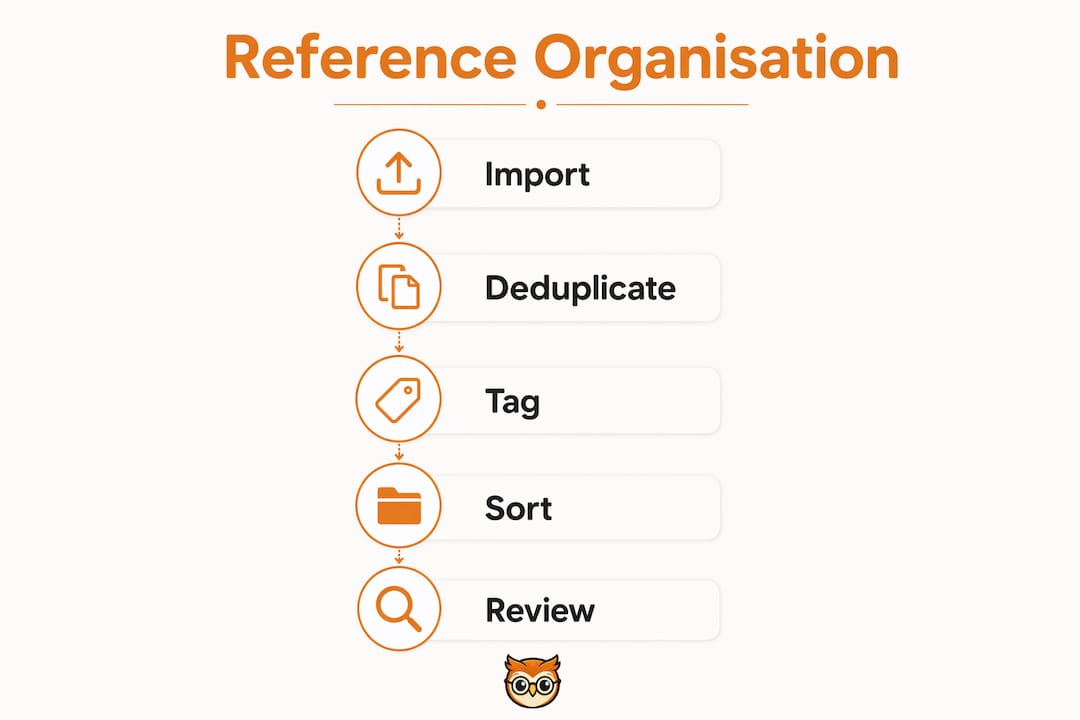
Avoid fragmented storage at all costs. One primary library, one canonical metadata record per source — that is the rule. The workflow is: ingest → clean import → tag and assign to a collection → attach PDFs → cite directly from the library.
| Category | Cost | Scalability | Automation support |
|---|---|---|---|
| Entry-level managers (e.g. Zotero free tier) | Free | Good for solo creators | DOI/ISBN lookup, browser importer |
| Advanced academic platforms | Paid subscription | Strong for teams | Crossref enrichment, Word/Docs plugins |
| Integrated marketplace storage | Varies | Scales with platform | Dependent on platform API |
For most solo creators, an entry-level manager covers everything. Zotero is free, supports over 9,000 citation styles, and integrates directly with Word, LibreOffice, and Google Docs. The reference management guide on the Bibliowlteca blog walks through setup in detail.
Step-by-step workflow:
- Import by DOI or ISBN — manual entry only when no identifier exists.
- Run duplicate detection and merge records.
- Attach searchable PDFs; run OCR on scanned documents so they are fully searchable.
- Assign each source to a collection (one per product or module).
- Apply a 'To cite' tag to anything earmarked for citation.
How automation saves you hours on metadata
Automate metadata capture wherever possible. DOI and ISBN lookups via Crossref pull author lists, publication years, journal names, and publisher details in seconds. Browser save tools capture web sources with a single click. Automation via DOI or ISBN lookup significantly reduces manual entry and speeds up onboarding of large libraries.
After every automated import, check these four things immediately:
- Author order: databases sometimes invert or truncate author lists.
- Publication year: preprint servers occasionally carry the wrong year.
- DOI validity: paste the DOI into doi.org to confirm it resolves.
- Title normalisation: remove ALL-CAPS titles and fix sentence case.
Look for tools that offer automatic metadata extraction, rule-based routing (e.g. auto-assign to a collection based on keyword), and OCR for scanned PDFs. Those three features together eliminate the majority of manual work.
Collections and tags: a taxonomy you can copy today
Use collections and tags together — they solve different problems. Collections are broad, project-level containers. Tags are cross-cutting labels that travel with a source regardless of which collection it sits in.
Sample taxonomy:
Collections (by product):
- Course A: Module 1, Module 2, Module 3
- Ebook X: Chapter 1, Chapter 2
- Research Pool (unassigned sources)
Tags (cross-cutting):
to-cite,to-read,methodology,dataset,language:es,language:fr,open-access
Tagging rules:
- Keep the controlled vocabulary to twelve tags or fewer.
- Colour-code your top five tags for visual scanning.
- Never create tag synonyms —
methodologyandmethodsare the same tag; pick one.
Maintenance cadence:
- Weekly (5 min): Tag any new imports; clear the inbox collection.
- Monthly (15 min): Run duplicate detection; spot-check five random metadata records.
- Quarterly (30 min): Archive completed product collections; review tag vocabulary.
Filename conventions that make retrieval instant
Use a consistent filename pattern: Author_Year_ShortTitle.pdf. For example: Smith_2022_LearningCurve.pdf. Combined with complete metadata, this pattern means a quick search on author name or year returns the right file immediately.
Two saved-search queries worth setting up in any reference manager:
author:"Smith" AND keyword:"curriculum"— narrows to a specific author's relevant work.tag:to-cite AND collection:"Course A"— returns every source ready to export for that product.
Pro Tip: Keep your controlled tag vocabulary to six high-value tags plus 'to-cite'. Saved searches built on that small set stay fast and return narrow, exportable results. The online library search guide has further saved-search examples.
Export, backup, and migration: what to keep and when
Export and back up regularly in interoperable formats: RIS, BibTeX or CSL JSON, and CSV. Keep these alongside your original PDFs.
Recommended schedule:
- Weekly (automated): Incremental export of new or modified records to a cloud folder.
- Quarterly (manual): Full library export in RIS + BibTeX + CSV; compress with PDFs into a dated archive.
- On migration: Package metadata export + original PDFs + a README documenting your naming convention, citation style, and tag vocabulary.
The README takes ten minutes to write and saves hours when you switch tools or hand a library to a collaborator. Long-term preservation of your library is also worth thinking about in the same breath as library resource management.
UK attribution, licensing, and copyright basics
Attribute every source clearly: author, title, year, publisher or URL. Record permission evidence whenever you reproduce long extracts or images. UK copyright law provides a fair dealing exception for quotation, criticism, and review, but it does not extend to reproducing substantial portions of text or images without permission.
Practical rules for UK creators:
- Short quotations with clear attribution generally fall within fair dealing.
- Reproducing a full image, chart, or table almost always requires explicit permission.
- Creative Commons licences vary — check whether the specific licence permits commercial use and adaptation.
- Keep a permissions log: source, licence type, date of permission, and any conditions.
For full legal detail, consult the UK Copyright Service or the official guidance at gov.uk. This article is general information, not legal advice — confirm your specific situation with a qualified professional.
How to present references inside ebooks, courses, and digital products
Place references where learners expect them. For ebooks, use inline parenthetical citations throughout the text and a dedicated 'References' chapter at the end. For course lessons, expandable footnotes keep the reading flow clean. For instructor-facing materials, a downloadable bibliography in multiple formats is the professional standard.
Downloadable-bibliography workflow:
- Tag all sources 'to-cite' within the relevant collection.
- Export selected items as BibTeX, RIS, and a human-readable PDF.
- Bundle these into a ZIP file attached to the product listing.
Pro Tip: Add a short 'How to cite this course' note in your product metadata. It reduces support queries from instructors who need to reference your material in their own syllabi. The practical guide to building bibliographies covers the full export workflow.
Reference managers with word-processor integration — Word, Google Docs, LibreOffice — let you insert citations while drafting and reformat the entire document if you later switch styles. For creators using FinalDraft, the edit-history feature pairs well with citation insertion, keeping a clear record of when references were added or changed.
How to keep your reference library accurate over time
A reference library degrades without maintenance. DOIs break, preprints get retracted, and URLs go dead. Build a review habit rather than a one-off clean.
Set a quarterly reminder to check a random sample of twenty sources: confirm DOIs still resolve, verify that cited versions match published versions, and update any URLs that have moved. When a source is retracted or substantially revised, flag it immediately with a retracted tag and remove it from any 'to-cite' collections. For large libraries, prioritise sources cited in products that are still on sale — those carry the highest reputational risk if they are wrong.
How to handle multilingual and non-English references
Store the original-language title in the title field and add a translated title in the notes or abstract field. Most reference managers support Unicode, so accented characters and non-Latin scripts import cleanly. Tag multilingual sources with language:es, language:fr, or the relevant ISO 639-1 code so you can filter by language when building a product for a specific audience.
For citation formatting, APA 7th edition requires the original-language title followed by a bracketed English translation. MLA and Chicago handle this similarly. If your reference manager does not auto-format the translation bracket, add it manually in the suffix field of the citation editor.
How to cite non-traditional sources: websites, interviews, and datasets
Non-traditional sources need the same metadata discipline as journal articles. For websites, capture the author (or organisation), page title, site name, full URL, and access date at the moment you save the source — URLs change, and a broken link in a published product looks careless. The types of library resources guide covers the full range of source types you are likely to encounter.
For interviews, record the interviewee's name, role, date, format (in-person, video call), and whether consent to cite was given. Store the consent record alongside the reference entry.
For datasets, cite the dataset itself, not just the paper that used it. Include the repository name, version number, DOI, and access date. Most major repositories (UK Data Service, Figshare, Zenodo) issue persistent DOIs, which makes citation straightforward.
Key takeaways
A clean, single-library reference system built around consistent metadata and a 'to-cite' tag is the fastest route to retrieving any source in under ten seconds.
| Point | Details |
|---|---|
| One library, one style | Centralise all sources in one reference manager and set a single citation style (APA, MLA, or Chicago) from day one. |
| Clean import first | Fix metadata at ingestion — author order, DOI validity, year — not at the end of a project. |
| Retrieval benchmark | Design your tagging and saved searches so any source is findable in under ten seconds. |
| Export regularly | Back up in RIS, BibTeX, and CSV weekly (automated) and quarterly (full archive with PDFs). |
| Bibliowlteca delivery | Attach exported bibliography files to your product listings on Bibliowlteca so buyers receive citable, professionally packaged resources. |
Why a clean reference system is a business asset, not just good practice
The conventional wisdom treats reference organisation as an academic chore — something you do to satisfy a style guide. That framing undersells it badly. For creators selling educational products, a well-maintained reference library is a valuable business asset.
When a learner queries a source, you can answer much faster. When a marketplace asks for attribution evidence before approving a product, you can quickly export a formatted bibliography. When you update a course, you know exactly which sources need checking because they are tagged by module, not buried in a folder called 'misc research'. The credibility case for bibliographies makes this point clearly: buyers tend to trust referenced products more, and that trust can improve conversions.
Creators who treat their reference library as infrastructure — something worth dedicating regular maintenance time to — publish faster, handle fewer support queries, and maintain cleaner licensing records into every marketplace submission.
Bibliowlteca makes it straightforward to deliver referenced products
If you are already building a clean reference library, the next step is packaging it into a product buyers can actually use. Bibliowlteca supports selling ebooks and courses with attached file bundles, so you can include a downloadable bibliography alongside your main content without any technical workaround.

The platform handles multiple file formats, global payments in multiple currencies, and the metadata fields you need for proper attribution. Instructors who buy your course get the bibliography ZIP; buyers in any market pay in their own currency; and your licensing records live in the product metadata where they belong. Upload a sample product, attach your exported bibliography, and see how the delivery flow works. Start listing your content on Bibliowlteca today.
Useful sources and further reading
- Organise — Reference Management: a Practical Guide (University of York): Covers collections, tags, duplicates, and PDF management across EndNote, Paperpile, and Zotero.
- Citing Sources — Harvard Guide to Using Sources: Explains APA, MLA, and Chicago in-text and bibliography requirements clearly.
- Zotero — Your Personal Research Assistant: Free reference manager with word-processor plugins and support for over 9,000 citation styles.
- How to Build a Thesis Bibliography Without Losing Your Mind (DEEPNOTIS): Practical workflow guide including the retrieval-speed benchmark.
- How to Build a Clean, Organised Research Library (ResearchPal): Step-by-step advice on clean imports, metadata, and PDF management.
- AI File Organiser for Researchers (Sortio): Covers automation features including DOI lookup, metadata extraction, and interoperable export formats.
- UK Copyright Service: Official guidance on fair dealing, permissions, and licensing for UK creators.