
TL;DR:
- Reference management tools help researchers collect, organize, and cite sources efficiently to save time and ensure accuracy. They store metadata, PDFs, and notes, allowing quick citation style switches and reducing errors in large bibliographies. Using these tools actively improves academic integrity, streamlines workflow, and supports scholarly review processes.
Reference management is the practice of using specialised tools to collect, organise, and cite bibliographic sources accurately and efficiently in academic and professional work. Whether you are writing a dissertation, publishing a journal article, or compiling a professional report, managing your references systematically saves time, reduces errors, and protects your academic integrity. Recognised citation styles including APA, Harvard, and Vancouver each carry strict formatting rules. Reference management software automates those rules so you can focus on the substance of your writing rather than the mechanics of your bibliography.
What is reference management and why does it matter?
Reference management is defined as the systematic process of collecting, storing, retrieving, and citing bibliographic sources using specialised software. The term is often used interchangeably with citation management, though citation management tends to refer more narrowly to the act of formatting references, while reference management covers the full lifecycle from discovery to final bibliography.

The distinction matters because researchers who treat the two as identical often underuse their tools. A well-configured reference manager does far more than generate a bibliography. It stores PDFs, records your reading notes, tracks which sources you have cited in which documents, and lets you switch citation styles in seconds. That last point alone justifies adoption: manually reformatting 80 citations from Harvard to Vancouver style for a journal submission can take hours. Software does it in under a minute.
Academic institutions have long recognised the importance of reference management. University libraries at institutions including University College Cork and the University of Chicago actively train students and researchers in these tools, treating them as a core research skill rather than an optional extra. The importance of reference sources for credibility and integrity is well established across disciplines.
How does reference management software work?
Reference management software works by acting as a personal database for your bibliographic sources. You add references to your library, the software stores the metadata (author, title, journal, year, DOI, and so on), and you call on that data whenever you need an in-text citation or a formatted bibliography.
Collecting references
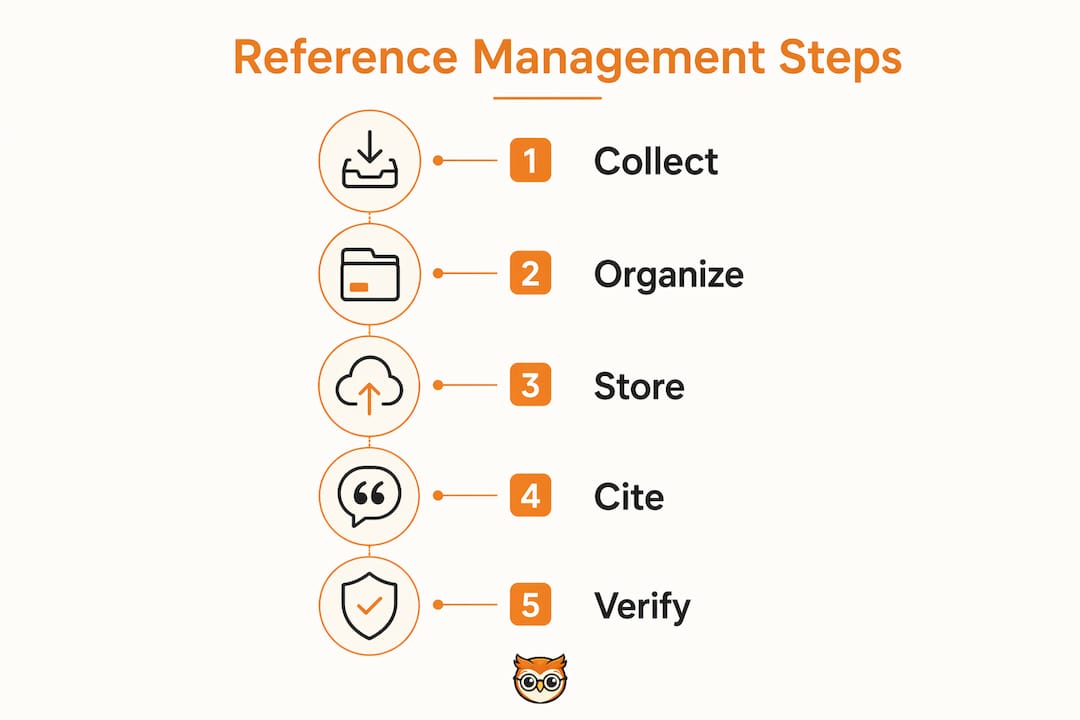
Most tools offer three collection methods. You can import a reference directly from a database using a DOI or PubMed ID, use a browser extension to capture metadata from a webpage or journal article with one click, or upload a RIS or BibTeX file exported from a database such as Web of Science or Scopus. Browser extensions are the fastest method for day-to-day research. They detect bibliographic data on the page and add it to your library without any manual typing.
Organising and storing your library
Once references are in your library, you organise them using folders, tags, and notes. A PhD researcher might create folders by chapter, a professional might tag sources by project or client, and a student might use colour labels to mark sources as read, unread, or key. Metadata accuracy is critical at this stage. If the imported metadata contains errors, your generated citations will carry those errors forward.
Generating citations and bibliographies
The most visible feature is the word processor plugin. Plugins for Microsoft Word and Google Docs let you insert in-text citations as you write. The software tracks every citation and builds a bibliography automatically at the end of your document. When you need to switch citation styles, you change one setting and the entire document updates instantly.
Feature comparison by category
| Feature category | Entry-level tools | Full-featured tools |
|---|---|---|
| Reference collection | Manual entry, DOI import | Browser extension, database sync, batch import |
| Word processor integration | Basic plugin | Word, Google Docs, LibreOffice plugins |
| Storage | Limited local storage | Cloud sync, team libraries, 2GB+ free tiers |
| Collaboration | None | Shared group libraries, annotation sharing |
| Citation styles | Core styles (APA, Harvard, MLA) | Thousands of styles, custom style editor |
| AI features | None | Summarisation, translation, pattern discovery |
Paid plans for full-featured tools range from around $20 to $165 per year depending on storage and collaboration needs. That price range reflects a meaningful gap in capability between entry-level and professional tiers.
Pro Tip: Install the browser extension for your chosen tool on day one. Capturing references at the point of discovery takes three seconds. Reconstructing them from memory or browser history later takes considerably longer.
Why is reference management essential for academic integrity?
Reference management is essential for academic integrity because it reduces citation errors, maintains consistency across large documents, and makes the peer review process smoother. A single incorrectly formatted citation in a submitted manuscript can delay publication or trigger a request for revision. Multiply that risk across a 200-source bibliography and the stakes become clear.
The benefits extend across different types of researchers:
- Students avoid accidental plagiarism by keeping a clear record of every source consulted, not just those cited in the final draft.
- Postgraduate researchers manage hundreds of sources across multi-year projects without losing track of where a specific finding appeared.
- Academic staff maintain consistent citation styles across co-authored papers, grant applications, and teaching materials.
- Professionals in regulated fields such as medicine, law, and public policy meet formal referencing requirements for reports and submissions.
- Independent researchers and writers build credible, verifiable bibliographies that strengthen the authority of their published work.
Automation of style switching saves significant effort compared to manual edits. That efficiency gain is not trivial. A researcher who submits work to three different journals in a year, each requiring a different citation style, saves hours of reformatting with a single tool setting change.
Reference managers also support the peer review process indirectly. Reviewers and editors can verify cited sources more easily when references are formatted consistently and completely. Incomplete or inconsistent citations create doubt about the rigour of the underlying research. Well-managed reference lists signal scholarly care and attention to detail.
One important caveat: reference management software is an aid, not a substitute for scholarly judgement. The tools automate formatting. They do not evaluate whether a source is credible, current, or appropriate for your argument. That judgement remains entirely yours.
Common pitfalls and how to avoid them
Reference management tools are straightforward in principle but easy to misuse in practice. Knowing the common mistakes saves you from discovering them mid-project.
-
Storing non-bibliographic files in your library. Reference managers are designed for bibliographic data and associated PDFs only. Loading them with presentation slides, spreadsheets, or general web bookmarks degrades performance and can cause data corruption. Keep your reference library clean and purpose-specific.
-
Trusting auto-imported metadata without checking it. Software-generated citations depend entirely on the quality of the underlying metadata. Database records frequently contain errors: misspelled author names, incorrect page ranges, missing volume numbers. Always verify imported references against the original source before submitting any document.
-
Ignoring the RIS file format. The RIS format is critical for exporting and migrating your citation library between tools. If you ever need to switch software or share your library with a colleague using a different tool, RIS is the universal format that preserves your data. Export a backup regularly.
-
Switching tools frequently. Changing reference managers mid-project disrupts your workflow and risks data loss during migration. Academic librarians advise selecting a single tool supported by your institution and committing to it. Institutional support means access to training, troubleshooting, and sometimes free licences.
-
Neglecting to update your library as you write. Adding references retrospectively at the end of a project is error-prone. Add each source to your library the moment you consult it. This habit takes seconds per source and prevents the frantic bibliography reconstruction that plagues many final-year students.
Pro Tip: Before choosing a tool, check your institution's library website. Many universities provide free access to full-featured reference management software and offer dedicated training sessions. Using an institutionally supported tool gives you a direct support line when something goes wrong.
How to get started with reference management
Getting started with reference management does not require technical expertise. The process follows a logical sequence that becomes habitual within a few weeks.
- Choose your tool. Check what your institution supports and whether a free tier meets your current needs. Entry-level tools suit undergraduates and early-stage researchers. Full-featured tools with cloud sync and collaboration suit postgraduate researchers and academic teams.
- Install the word processor plugin. This is the feature you will use most. Install it before you start writing, not after. Most tools offer plugins for Microsoft Word and Google Docs, with setup taking under five minutes.
- Import your existing references. If you have a reading list or a set of saved PDFs, import them using DOI lookup or RIS file upload. Do not retype references manually unless no other option exists.
- Organise from the start. Create a folder or tag structure before your library grows large. Reorganising 300 references after the fact is far harder than organising 30 at the start.
- Use the browser extension for new sources. Every time you find a relevant article, capture it immediately. This single habit is the most effective way to build a complete, accurate library.
- Attend a library workshop. Most university libraries run reference management training sessions, often free and open to all students and staff. A one-hour session with a librarian will save you days of self-directed troubleshooting.
The learning curve for reference management tools is genuinely shallow. Most researchers reach comfortable proficiency within two or three writing sessions. The payoff compounds over time: every source you add to your library is available for every future project, building a personal research archive that grows in value throughout your career.
Library trends in 2026 show that AI-assisted features are becoming standard in full-featured tools. These include automatic summarisation of imported PDFs, metadata correction, and discovery of related research patterns. The gap between entry-level and full-featured tools is widening as a result. Researchers who adopt full-featured tools early will benefit from these capabilities as they mature.
Key takeaways
Effective reference management requires the right tool, consistent habits, and manual verification. Software automates formatting but cannot replace the researcher's responsibility to check accuracy and evaluate sources critically.
| Point | Details |
|---|---|
| Core definition | Reference management is the systematic collection, organisation, and citation of bibliographic sources using specialised software. |
| Citation style automation | Tools like those supporting APA, Harvard, and Vancouver switch styles instantly, saving hours of manual reformatting. |
| Metadata verification | Always check auto-imported references against the original source, as database metadata frequently contains errors. |
| RIS format for portability | Export your library in RIS format regularly to protect against data loss and enable migration between tools. |
| Institutional support | Choose a tool supported by your institution to access free training, licences, and troubleshooting assistance. |
Reference management in practice: what I have learned
The most common mistake I see researchers make is treating their reference manager as a passive archive. They add sources, generate a bibliography at the end, and assume the job is done. That approach misses most of the value.
The real gain comes from using your library actively throughout the writing process. When you tag sources by argument or theme, you can pull up every reference supporting a specific claim in seconds. When you add reading notes directly to a reference record, you build a searchable research journal inside your tool. These habits transform a reference manager from a citation formatter into a genuine thinking aid.
I have also watched researchers lose weeks of work by switching tools mid-project without exporting a proper RIS backup first. The RIS format exists precisely to prevent this. Export a backup every time you finish a significant writing session. It takes ten seconds and has saved more than one researcher from a very bad day.
The arrival of AI features in reference software is genuinely exciting, but it reinforces rather than reduces the need for diligence. AI-generated summaries and metadata corrections are starting points, not final answers. The researcher who checks the AI's work will always produce more reliable scholarship than the one who does not.
My honest advice: pick one tool, learn it properly, and use it for everything. The researchers I know who do this consistently produce cleaner manuscripts, submit with more confidence, and spend less time on corrections. Reference management is not glamorous. Done well, it is invisible. That invisibility is the point.
— BibliOWLteca
Bibliowlteca and your academic resource library
Building a strong reference library goes hand in hand with accessing quality source material. Bibliowlteca gives students and researchers access to a growing catalogue of academic eBooks and digital resources covering research methods, scholarly writing, and discipline-specific knowledge.

The platform supports instant digital delivery, so you can add a new resource to your reading list and have it in your reference manager within minutes. Whether you are looking for a methodology guide, a subject-specific text, or a structured course to sharpen your research skills, Bibliowlteca's digital content catalogue brings quality materials together in one place. Browse by subject, purchase securely, and build the resource library your research deserves.
FAQ
What is the difference between reference management and citation management?
Reference management covers the full process of collecting, organising, storing, and citing sources. Citation management refers more narrowly to formatting in-text citations and bibliographies in a specific style such as APA or Harvard.
Do reference management tools work with all citation styles?
Full-featured reference management tools support thousands of citation styles and can switch between them automatically. Entry-level tools typically cover the most common styles including APA, Harvard, MLA, and Vancouver.
Is reference management software free to use?
Most tools offer a free tier with limited storage, typically around 2GB, which suits students and early-stage researchers. Paid plans range from approximately $20 to $165 per year for expanded storage and collaboration features.
Can I trust the citations my software generates automatically?
Reference management software generates citations based on imported metadata, which can contain errors. Always verify generated citations against the original source before submitting any academic or professional document.
What is a RIS file and why does it matter?
A RIS file is a standardised format for exporting and importing citation libraries between different reference management tools. Exporting in RIS format protects your data and prevents lock-in to a single software provider.