
TL;DR:
- Most digital learning products have low completion rates, often below 13%, due to poor design and unmet expectations. Implementing inclusive frameworks like Universal Design for Learning and engaging, modular course structures significantly enhances learner retention and accessibility. Prioritizing these principles benefits both learners and creators by expanding reach, improving feedback, and boosting long-term success.
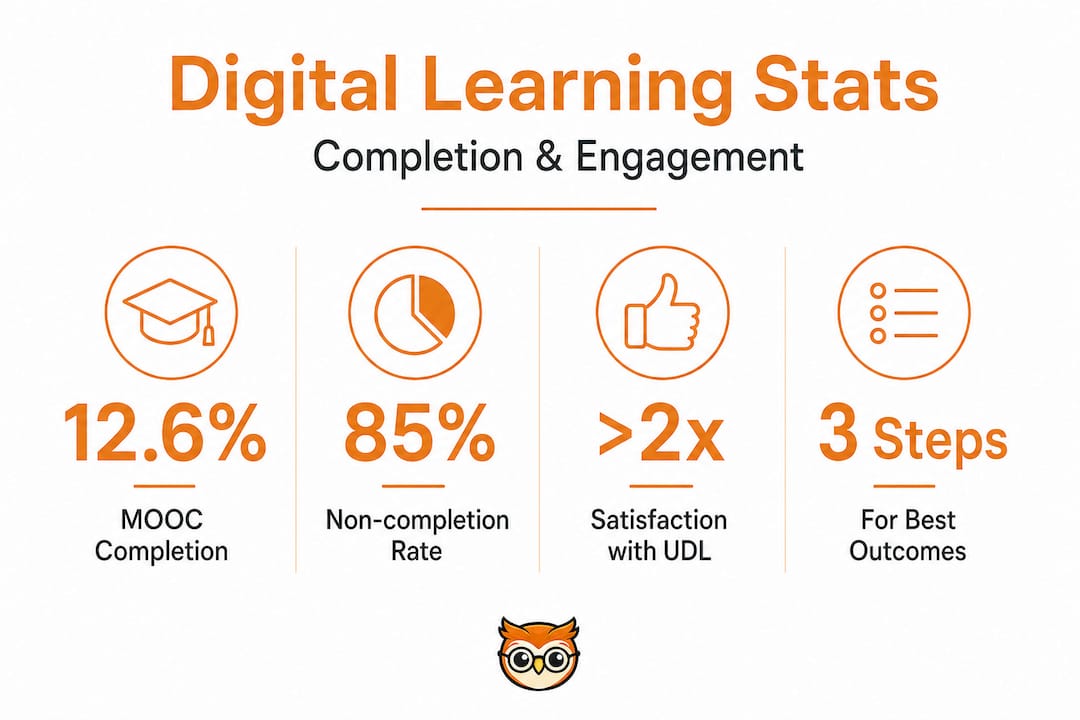
Most creators who launch digital learning products believe their course will change lives. The hard truth is that MOOC completion rates sit at a median of just 12.6%, meaning nearly nine out of ten learners who enrol never finish. That is not a minor inconvenience. It represents lost revenue, wasted effort, and a missed opportunity to genuinely teach. This guide exists to help you understand why that gap exists, and more importantly, how to close it through better design, inclusive practices, and a smarter approach to monetising your digital learning products.
Table of Contents
- Why digital learning often fails to deliver impact
- Universal Design for Learning: Making digital courses truly accessible
- Practical accessibility strategies for digital learning products
- Designing digital courses for higher engagement and completion
- Why prioritising accessibility and engagement pays off: Our perspective
- Take your digital learning products further with BibliOWLteca
- Frequently asked questions
Key Takeaways
| Point | Details |
|---|---|
| Completion rates are low | Most digital courses have completion rates below 15%, making engagement a central challenge. |
| UDL boosts accessibility | Universal Design for Learning helps your digital products reach and benefit more learners from the start. |
| Accessibility drives sales | Accessible products attract wider audiences, improving both impact and revenue. |
| Short and interactive works best | Shorter or modular courses with interactive assessment have higher learner completion rates. |
Why digital learning often fails to deliver impact
To understand how to succeed with digital learning, we first need to explore the common pitfalls and why they matter.
Digital learning is everywhere. From sprawling university platforms to solo creator courses sold directly online, the volume of available content has never been greater. Yet quantity and quality are very different things. The promise of learning at your own pace, from anywhere in the world, has attracted millions of learners. The reality is that most of them disappear within the first two weeks.
The median completion rate for MOOCs hovers around 12.6%, and for certain formats such as long-form, lecture-heavy courses with minimal interaction, it dips even lower. These figures are not simply a reflection of learner laziness. They signal a much deeper problem with how digital learning products are designed and delivered.
One of the most important lessons from the data is that course structure heavily influences completion, including factors like assessment type, course length, pacing, and the presence or absence of community elements. A self-paced course with no deadlines and no feedback mechanisms will almost always underperform a structured course with clear milestones and regular check-ins, even if the actual content is identical.
Research on MOOC adoption consistently shows that courses fall short of learner expectations, and this mismatch is a significant driver of abandonment. Learners sign up expecting transformation and often receive a sequence of talking-head videos. The gap between what was promised and what was delivered is where completion rates collapse.
There is also the question of what completion actually means. Partial learning is not failure. Many learners enrol with narrow, specific goals: they want one technique, one answer, one concept. They get what they came for and leave. This does not show up as a "completion" in your analytics, but it is a successful learning event. Understanding this distinction helps you design products that serve both goal-oriented learners and those seeking depth.
| Factor | Online learning | Face-to-face learning |
|---|---|---|
| Average completion rate | 12.6% (MOOCs) | 70%+ (formal programmes) |
| Learner engagement | Variable, often passive | Higher, due to social presence |
| Assessment flexibility | High, but often poorly used | Structured, with clear expectations |
| Accessibility | Global reach | Geographically limited |
| Cost to creator | Lower at scale | Higher per cohort |
Looking at digital engagement outcomes more broadly, schools and institutions that invest in structured digital frameworks consistently see better results than those that simply digitise existing materials without rethinking delivery.
"The format of online learning is not the problem. The problem is treating it as a lesser version of classroom teaching rather than a distinct medium with its own rules."
The impact of online assessment design is also frequently underestimated. Assessments that provide immediate, meaningful feedback keep learners on track. Those that merely gate progress without supporting it push learners away. This is a design choice, not a technology limitation.
Understanding these patterns is the first step. Once you see why most digital learning products struggle, you can start making deliberate decisions that set yours apart. Staying current with digital education trends is an important part of that ongoing process.
Universal Design for Learning: Making digital courses truly accessible
Having seen the challenges, let us explore a proven approach for building digital learning that includes everyone.
Universal Design for Learning, commonly known as UDL, is a framework developed by the Centre for Applied Special Technology (CAST) that rethinks how educational content is structured from the ground up. Instead of designing a course for an imagined "average" learner and then retrofitting accommodations for everyone else, UDL starts with the full spectrum of human diversity in mind. The result is content that works better for all learners, not just those with specific needs.
The core insight of UDL is that there is no single optimal way to learn. Some people absorb information most effectively through reading. Others need to hear it spoken aloud. Others need to do something with the material before it sticks. UDL emphasises multiple means of engagement, representation, and expression, offering flexible pathways that respect these differences rather than forcing learners into a single channel.

For creators selling digital learning products, this framework carries a practical commercial argument too. A course that works for learners with visual impairments, those who speak English as a second language, those with attention difficulties, and those on slow internet connections simply reaches a larger audience. Accessibility is not charity. It is good product design with measurable return on investment.
Here are the core UDL principles applied directly to digital learning products:
- Multiple means of representation: Deliver the same core idea in text, audio, and visual formats. Do not rely on any single modality.
- Multiple means of engagement: Offer choice in how learners interact with content. Self-paced with optional live sessions, for instance.
- Multiple means of expression: Allow learners to demonstrate their understanding through different methods, written responses, practical tasks, or short video submissions.
- Flexible navigation: Structure your course so learners can return to earlier material, skip ahead if they have prior knowledge, and find what they need quickly.
- Consistent, clear language: Avoid jargon unless you define it immediately. Write at a level that respects your learner's intelligence without assuming prior expertise.
Incorporating UDL from the very beginning of your course design is significantly easier than going back to retrofit it. If you build your video content with captions from day one, the cost and effort is minimal. If you add them six months later to an entire library of videos, it becomes a major project. This is the same principle that applies to physical architecture: a ramp is far cheaper when built into the original design than when added later.
Pro Tip: Audit your existing content by picking one module and going through it as if you are a learner who cannot see the screen, only hear audio. Does the content still make sense? Do the links and buttons make logical sense when read aloud? This simple exercise reveals accessibility gaps that visual inspection misses entirely.
The growing range of digital classroom tools available in 2026 makes UDL implementation more practical than ever. Many platforms now offer built-in captioning, accessible templates, and flexible content delivery options that reduce the technical burden on individual creators.
For those building a sustainable education business, the question of how to reach learners through inclusive distribution platforms is just as important as the content itself. Distribution and design work together. You can read further about strategies for scaling your education business to understand how inclusive design connects to long-term commercial growth.
Insights on improving online learning experience consistently reinforce that learner satisfaction rises sharply when content is accessible, flexible, and well-structured. Satisfied learners leave better reviews, refer others, and buy your next product. The business case writes itself.
Practical accessibility strategies for digital learning products
With an understanding of inclusive frameworks, it is time to move from theory to specific actions that will set your product apart.
Knowing that accessibility matters is not the same as knowing how to implement it. Many creators intend to make their products accessible and simply do not know where to start. Here is a clear, practical sequence to follow.
- Provide text alternatives for all non-text content. Every image should have meaningful alt text that describes what the image conveys, not just what it shows. A graph showing revenue growth should say "Bar chart showing 40% revenue increase over 12 months" rather than simply "graph."
- Caption and transcribe all audio and video content. Auto-generated captions are a useful starting point, but always review and correct them. Errors in auto-captions are often worst for specialised vocabulary, which is precisely the terminology your learners most need to understand.
- Use meaningful link text. Accessibility best practices specify that link text should describe the destination or action, not simply say "click here." A screen reader user navigating by links alone needs "Download the course workbook" not "Download here."
- Ensure sufficient colour contrast. Text needs a contrast ratio of at least 4.5:1 against its background for standard text. Many creators choose attractive brand colours that fail this test and make content genuinely difficult for visually impaired learners.
- Avoid auto-playing media. Auto-play video or audio is disorienting for many learners, particularly those using screen readers or those with cognitive difficulties. Always give learners control over media playback.
- Test across devices. A course that works beautifully on a desktop computer but breaks on a smartphone is not truly accessible. Many of your international learners may access content entirely on mobile devices.
- Use accessible document formats. PDFs should be tagged properly so that screen readers can navigate them. Word documents converted to PDF without accessibility checks are frequently unusable for people with visual impairments.
| Accessibility area | Minimum standard | Recommended practice |
|---|---|---|
| Video content | Auto-generated captions | Reviewed captions plus full transcript |
| Images | Alt text present | Descriptive alt text, no decorative alt text clutter |
| Colour contrast | 4.5:1 for body text | Test all colour combinations with a checker tool |
| Link text | Descriptive text used | Unique, action-oriented text for every link |
| Document formats | Accessible PDF | Tagged PDF plus downloadable accessible Word version |
| Mobile compatibility | Content displays on mobile | Fully responsive layout, tested on multiple devices |
The benefits for you as a creator are substantial. Accessible content meets legal requirements in many jurisdictions, including the European Accessibility Act which takes effect for digital products in 2025 and 2026. Beyond compliance, accessible products generate consistently better learner feedback, reach wider international audiences, and demonstrate professional quality that commands higher prices.
Pro Tip: Before launching any new course, recruit two or three learners who regularly use assistive technology such as screen readers or voice navigation. Ask them to go through a sample module and note any friction points. Their feedback will surface issues that automated checkers miss, and it builds genuine goodwill with communities that are consistently underserved by digital learning products.
For those working through the full process of creating and distributing accessible content, a detailed guide to publishing accessible content is an essential resource. If you are specifically focused on courses, the guide on selling accessible online courses covers the commercial side in depth. And for those whose products include written materials, exploring how ebooks support digital learning reveals additional strategies for improving accessibility in text-based formats.
Designing digital courses for higher engagement and completion
Now, let us bring together design and practice to drive actual course success.
Knowing your content is accessible and inclusive is a strong foundation. The next layer is engagement design, the deliberate choices you make to keep learners motivated, progressing, and ultimately completing your course. Assessment type and course design are among the most powerful variables you control as a creator.
Engagement in digital learning is not about entertainment. It is about relevance, momentum, and feedback. Learners disengage when they cannot see the point of what they are doing, when progress feels invisible, or when they wait days for feedback on an assignment. Each of these is a design problem with a design solution.
Here are the highest-impact engagement methods supported by current research and real-world experience:
- Modular structure with short units: Divide your course into modules of 10 to 20 minutes rather than hour-long lectures. Learners are far more likely to start a module they can finish in one sitting.
- Early wins: Design your first module to deliver a tangible, applicable result. When learners see immediate value, they continue. When the first module is purely theoretical background, many do not return.
- Regular low-stakes check-ins: Short quizzes after each section serve two purposes. They reinforce learning and they give learners a sense of progress. Neither purpose requires grading by the creator.
- Community features: Even a simple discussion board or peer feedback option dramatically improves completion rates. Social accountability is one of the most reliable drivers of follow-through.
- Progress indicators: A visible progress bar or checklist is a small design element with a disproportionate effect on motivation. Learners want to see how far they have come and how far they have to go.
- Varied content formats: Mixing video, text, audio, interactive exercises, and downloadable resources prevents the monotony that drives learners away from single-format courses.
Short courses and modular content consistently outperform long, monolithic programmes. This is not simply because they are easier to complete. It is because they create natural breakpoints that allow learners to re-engage after interruptions, celebrate completion milestones more frequently, and return for additional modules rather than feeling locked into a single overwhelming commitment.
Pro Tip: Implement auto-graded quizzes with immediate explanatory feedback rather than simply marking answers as right or wrong. When a learner gets a question wrong and immediately sees why, they learn more and feel more supported than when they receive a score with no context. This single change can measurably improve both retention and completion rates in your analytics.
The connection between engagement and effective reading and resource lists is also worth noting. Research-backed guidance on building engaging reading lists shows that curated, purposeful supplementary materials enhance learner depth and increase the perceived value of your course.
For practical inspiration on putting engagement principles into action, digital engagement tips from schools in the UK offer transferable lessons for course creators at any level. Institutions that have invested in structured engagement strategies report measurably better outcomes and learner satisfaction scores.
The goal is not to make your course easier. It is to remove the friction that prevents motivated learners from completing what they started.
Why prioritising accessibility and engagement pays off: Our perspective
We have worked with hundreds of creators on the BibliOWLteca platform, and the single most consistent pattern we see is this: the creators who treat accessibility and engagement as optional extras almost always plateau. The creators who treat them as core product design decisions grow.
Most people building digital courses focus their energy on production quality. They invest in better cameras, better microphones, better slide templates. These things matter. But they are not what determines whether a learner completes your course, buys your next one, or tells a colleague about you. What determines those outcomes is whether your product genuinely works for the learner sitting in front of it.
The uncomfortable truth is that most accessibility work costs very little. Adding captions, writing meaningful alt text, structuring content logically. These are not expensive undertakings. They are habits. The creators who build these habits early find that their products launch faster, attract less negative feedback, and command stronger prices in international markets where accessibility expectations are higher.
We have seen creators on our platform make a handful of focused changes: improving their caption quality, restructuring their course into shorter modules, adding a simple community space, and redesigning their assessments to give immediate feedback. The results were not marginal. Completion rates improved significantly, refund requests dropped, and positive reviews increased. These were not creators with larger budgets or more polished video. They were creators who understood that their learner's experience is the product.
The broader lesson we keep returning to is this: moving from minimum compliance to genuine inclusion is not just an ethical stance. It is a commercial strategy. Learners who feel genuinely served by your content become your best marketing asset. They share, review, return, and recommend. No advertising budget replicates that.
For those ready to think seriously about what it means to thrive with digital products long term, the investment in accessible, engaging design is where durable success is built.
Take your digital learning products further with BibliOWLteca
If you are ready to apply these frameworks and see measurable impact, explore the practical tools available right now.
BibliOWLteca was built specifically for educators and content creators who want to turn their knowledge into a sustainable digital business without wrestling with payment systems, delivery infrastructure, or tax compliance. Whether you are publishing e-books, online courses, or training programmes, the platform handles the operational complexity so you can focus on creating content that genuinely works.

From setting up your online store for digital courses to reaching learners in multiple currencies across the globe, BibliOWLteca provides the infrastructure that turns good content into a real business. You can explore everything the platform offers at bibliowlteca.com and start applying these accessibility and engagement principles to products that are ready to reach every learner, everywhere.
Frequently asked questions
What is the most common reason digital learning courses have low completion rates?
Low engagement, mismatched learner expectations, and poor course design are the leading reasons, with research confirming that completion is shaped by assessment type, course length, and structural choices made during development.
How can I make my digital course more accessible to a diverse audience?
Incorporate Universal Design for Learning by offering multiple means of representation, engagement, and assessment from the outset, as UDL's core principles prioritise flexibility and inclusion for every learner regardless of ability or background.
What accessibility steps are easiest to implement for beginners?
Start with clear, descriptive link text, captions and transcripts for all media, and compatible document formats, all of which are flagged as foundational by digital accessibility guidance for learning materials.
Do shorter courses genuinely improve learning outcomes and completion?
Yes. Empirical research links shorter course lengths with higher completion rates, and practical experience consistently confirms that modular, bite-sized content reduces dropout and improves learner satisfaction.